Are you nervous after getting a Segmentation Fault in C Homework? Then, you don’t need to worry about it because you can easily handle it if you know about to “Debug Segmentation Fault in C”.
The C Segmentation Fault is the most common and frustrating error that one can face while solving C programming homework. So, to help you, we have brought this article on Segmentation Fault Debugging.
But still, if students get stuck in their C assignments and projects, they look for C Homework Help, and that’s where the programming experts of CodingZap come into the picture.
In this article, we will first talk about the Segmentation Fault and its common causes. Later, we will describe different methods to debug C Segmentation Faults easily. So, let us deep dive into it.
TL;DR Table: Debug Segmentation Fault In C
Aspect | Summary |
Segmentation Fault | A Segmentation Fault is a runtime error that happens when a program tries to access memory it is not allowed to. |
Debugging Methods |
|
GNU Debugger | A command-line tool that checks C programs and mentions the statement where the crash has happened. |
Print Statements | Printf() Statements are added in between the code to check the error point. |
Checking Null Pointer | Checking that all the pointers are initialized before using them in the C code. |
Checking Array Access | The array should be accessed within the valid range of the array. |
What Is A Segmentation Fault In C Language?
The Segmentation Fault, or Segfault, is a runtime error that happens when a program tries to access memory outside its permission section. When we are using Pointers and Arrays, such issues are very common.
In C Programming, every program gets a certain space to save the Variables, Data, and other information. If the program tries to read or write information beyond that memory space, the Segmentation Fault Error happens.
A segmentation fault can occur for many reasons. Let us check some of the common causes of it.
Common Causes Of C Segmentation Fault:
- NULL Pointer Dereference: When we are accessing memory with an un-initialized pointer.
- Unallocated Pointers: If the pointers are initialized but no memory is allocated, then such issues arise.
- Out-of-Bounds Access: When we try to access any data beyond the limit or bounds of an array.
- Occupied Pointers: After using the pointers, we forget to close them, which impacts the memory.
What Are Some Methods To Debug Segmentation Fault In C Homework?
After having a strong base about the Segmentation Fault, we can start discussing the central theme of the article, for which you are all waiting. In this section, we will describe the debugging methods of Segfault.
There are 4 different methods by which we can debug the Segmentation Fault in the C Homework. Let us check them one by one carefully to have a deeper understanding of the concept.
Method 1: Using GNU Debugger
The first way by which we can debug the Segmentation Fault in C Programming is by using the GNU Debugger. The GDB or GNU Debugger is a command-line tool that helps to identify errors in the code.
The GNU Debugger highlights the sentence where the Segmentation Error is happening in the code. To do so, we have to execute the C Program with the debugging information. Let us check it.
gcc -g [Program Name].c -o [Program Name]
gdb ./ [Program Name]
Method 2: Using Print Statements
Print Statements in C programming can also be used as an alternative debugging method. This method can be termed as the Manual Tracing of the Segmentation Fault in your C Language Homework.
Here, the Printf() Statements are used to trace the program execution. If a Printf() statement is executed and the next Printf() statement is not executed, then a Segfault occurs in between.
#include
int main()
{
int *ptr = NULL; // A NULL Pointer Is Declared
printf("Before Accessing The Pointer\n ");
*ptr = 10; // The Segfault Will Happen Here
printf("After Accessing The Pointer\n ");
return 0;
}
Explanation Of The Program:
- At first, a Null Pointer will be initialized in the program. After that, a Printf() statement is used.
- Later, we assign Value 10 to the pointer and again print a statement.
- From the output, we can see that the first print statement executes, but the next one does not.
- Hence, the Segmentation Fault happens between those two print statements.
Output:
Method 3: Checking For NULL Or Uninitialized Pointers
The Segmentation Fault can occur with any NULL or Uninitiated Pointers. So, in your C Homework, if you are working with pointers, then you have to be careful with them.
Either you should not leave any NULL or Uninitialized Pointers in the code, or use a checking method to save yourself from any accidental cases. Let us check the following code to implement a checking method.
#include
#include
int main()
{
int *ptr = malloc(sizeof(int)); // Initializing New Pointer
if (ptr == NULL) // Checking For A Null Pointer
{
printf("Memory Allocation Error ");
return 1;
}
*ptr = 23; // Assigning A Value To Pointer
printf("Pointer Value: %d ", *ptr);
free(ptr); // Free The Pointer
return 0;
}
Explanation Of The Program:
- At first, a Pointer PTR is implemented in the program.
- Then, an IF Statement is defined which will check any NULL or Uninitialized Pointers.
- If there is any Null Pointer, the code will terminate normally without showing errors.
- If the Pointer is not null, then the remaining parts of the code will happen.
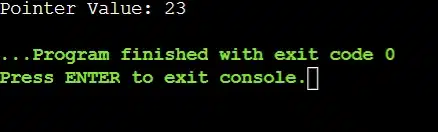
- Later, we will assign a value to the pointer and print it to show that the program is executing well.
Output:
Method 4: Checking The Array Access
Along with the pointers, the arrays are another prominent reason for which one can get Segmentation Faults in their C codes. If we are accessing outside of the array limit, then a Segfault can happen.
Every time, we have to ensure that, whatever the limit of the array is declared, we are utilizing that much of the memory. Unfortunately, we have to always manually ensure the array access in the C code.
#include
int main() {
int arr[5]; // The Array Can Only Store 5 Items
for (int i = 0; i <= 7; i++) // The Range Of For Loop Is Beyond
{
arr[i] = i * 10;
}
return 0;
}
Explanation Of The Program:
- Initially, an array with an index value of 5 is declared. So, the array can only store 5 items.
- Now, a For Loop will be executed that will end on the Value 7, which is beyond the array limit.
- In that case, we will encounter the Segmentation Error, which we need to debug on our own.
Output:
How Can We Prevent Segmentation Fault In C Homework?
So, after such an extensive discussion, we hope that if you get a Segmentation Fault in your C Homework, you can easily wipe it out. However, it is always better if you never encounter a Segfault in your code.
For that purpose, you have to know about some tips that can guide you to avoid Segmentation Faults in your C Programs. Letus review the following list to learn about these tips.
- If we are using any pointers, then we have to always initialize them in the code.
- We should not access an array beyond its limit using any For Loop or other programming items.
- Using Malloc(), the Pointers should be checked to see whether it is returning Null Values or not.
- Whenever we are using recursion, the Base Case should be present to stop the recursion at some point.
- In Scanf() and Printf(), the Safe Format Specifiers should be used to avoid memory issues.
Conclusion:
In the end, we can say, “Debug Segmentation Fault in C” is not that much of difficult.
Try to avoid making Segmentation Faults in your C Programming Homework. Still, if you make such errors, don’t panic. Use any one of the discussed methods, and surely you will come out of such a situation.
Takeaways:
- GDB, Print Statement, Checking Null Pointers, and Array Access are some debugging processes.
- The GNU Debugger helps to highlight the statement where the Segfault is happening.
- The Print Statements are used as a Manual Tracing to find out Segmentation Faults in the code.
- In any C code, there should not be any NULL or Uninitialized Pointers.
- If the array is going out of its limits or bounds, then a Segmentation Fault can happen.


