Errors in C Programming: Types, Causes, and Examples Explained

Errors in C Programming

Learning the C language is an important step for many school and college students, but it often feels confusing at the beginning. This is because of some complicated “Errors in C programming”.

One small mistake in the code can stop the entire program, which can be frustrating and demotivating for beginners. C programming errors are not signs of failure; they are part of the learning process.

Knowing why these errors occur helps students fix them faster and write better code over time. In this article, we will explain the different types of errors in C simply and practically.

TL: DR: Errors In C Programming

Aspect

Summary

Compile-Time Errors

These errors occur while the code is being compiled and prevent the program from running. They are mostly caused by syntax-related mistakes.

Runtime Errors

Runtime errors appear when the program is already running and may cause it to crash or behave unexpectedly. They often result from invalid operations.

Linker Errors

Linker errors occur after successful compilation when required functions or files cannot be linked together. They usually indicate missing definitions or incorrect connections.

Logical Errors

Logical errors allow the program to run without interruption but produce incorrect results. These errors happen due to flawed logic rather than syntax or execution issues.

What are Errors in the C Program? Read Below

Errors in a C program occur when the programmer writes code that does not follow the rules of the C language. Every programming language, including C, understands only code written in its specific syntax and structure.

When the programmer writes code in an incorrect format, the compiler detects the mistake and generates an error. These error messages help the programmer identify where the problem occurred and what needs to be corrected in the code.

visual representations of Errors in C Programming

It is like a situation where you only know English and an individual is talking with you in French. As you don’t know French, you will not understand what the individual is talking about.

This same thing goes for the compiler, also. The C compiler only knows a particular set of rules & grammar format. Writing the code differently will cause an error.

Why Do Students Struggle With Errors In C Programming?

From our expertise, we can say that most students struggle with errors in C, not because they lack intelligence. But the sole reason is that C is a strict and rule-based language where no small mistakes are tolerated.

Here are some more reasons why students struggle with errors in C programming.

  • C programming requires exact syntax, and even a missing semicolon can cause an error.
  • Error messages shown by the compiler are often difficult for beginners to understand.
  • Students usually focus on writing code quickly rather than understanding how it works.
  • Many learners copy code from books or the internet without learning the logic behind it.
  • C does not guide beginners with friendly suggestions like some modern languages do.

If we try to give a practical view of these confusions, the following code snippet can be formed. Let us go through it.

				
					// Beginners expect C to forgive small syntax mistakes
int x = 10 // Missing semicolon breaks the entire program
int y = 20; // Exact syntax is mandatory in C

// Confusing compiler errors that don’t clearly explain the mistake
printf("%d\n", x); // Error message may point here, not at the missing ';'
printf("%d\n", y); // Beginners struggle to trace the real issue

// Writing code fast without understanding execution flow
int result = x + y; // Student knows this works
printf("%d\n", result); // But may not understand how values are stored and added

// Copying code without understanding pointers and memory
int *ptr = &x; // Pointer syntax is copied from examples
printf("%d\n", *ptr); // Dereferencing works, but logic is unclear

// Expecting C to guide or warn like modern languages
scanf("%d", x); // Missing '&' causes runtime issues
printf("%d\n", x); // C gives no friendly suggestion or fix


C programming errors might look confusing for beginners, but if you listen to your mentor, understanding the error messages will become a breeze by the end of this article.


What are the Types of Errors in C?

In the C programming language, there are mainly four types of errors present. Depending upon the mistakes made by the programmers, these categories have been created. Let’s make a list of those errors:

  1. Compile Time Error
  2. Run Time Error
  3. Linker Error
  4. Logical Error

Let’s know each of the errors one by one in a detailed way. 

Many C errors happen because the program treats one data type as another without proper handling. If you want to understand how this problem appears in other languages, too, it’s worth learning about Type Conversion in Programming Languages.


What are The Compile Time Errors in C?

As the title says, this type of error occurs when the code is compiling. This type of error is often termed the Syntax Error. In this type of error, programmers generally make mistakes in the syntax structure.

This means they forget to provide the end braces (‘}’), forget to provide the semicolons, etc. Sometimes, syntax errors related to the loops can create such problems.

Why Students Commonly Face Compile-Time Errors:

  • Students forget to use semicolons at the end of statements.
  • Students opened the Brackets { }, but they forgot to close them properly.
  • Some keywords, like printf or main, are misspelled in the code.
  • If you miss including the Header files or write them incorrectly.

These errors should be fixed before the code runs. If these errors are present in the code, it restricts the compilation of the code.

				
					// Declaring The Header File
#include <stdio.h>
// Calling main Function
void main()
{
    // Declaring The Variable
    int i;
    // For Loop Defect-Comma Instead of Semicolon
    for(i=0;i<10,i++)
    {
        // Simple Statement
        printf("Hello C Language");
    }
}


Steps Of The Program:

  1. Declare the required header file inside the program before developing the main function.
  2. Inside the main function, declare a for loop where the syntax error should be present.
  3. Inside that for loop, try to print any random data.

Output:

Output for Compile time errors in C programming

Here, the output clearly shows where we have made the errors. It is showing that instead of using a semicolon, a simple comma is used. So, the output is correct here.

Understanding The Connection Between Compile-Time And Syntax Errors:

It is important to note that syntax errors are actually a subset of compile-time errors. In other words, whenever the compiler stops and shows an error due to incorrect code structure, it is for a syntax problem.

  • Whenever a compile-time error appears, first check the syntax, because most compile-time errors are caused by syntax issues.
  • Think of syntax errors as the “gateway” to successful compilation, which can save a lot of debugging time.
  • Many students get frustrated debugging compile-time errors without realizing that simple syntax mistakes are the cause.
  • By paying careful attention to proper syntax while coding, you can prevent a large portion of compile-time errors before even running your program.


What are The Runtime Errors in C?

As the title says, this type of error occurs when the compiler tries to run the code & provide the output. This means this type of error successfully skips the compilation step. But it gets stuck while running the code.

This type of error can successfully pass through the compile time as the programmers have written them correctly. Their syntax is correct, but their work is not applicable.

Why Students Commonly Face Runtime Errors:

  • Sometimes, it can be seen that Division by zero is attempted without proper checks.
  • Invalid memory access occurs due to uninitialized pointers.
  • Students sometimes provide wrong input values during program execution.
  • Array index limits are crossed unknowingly.

Let’s take an example where we try to divide one number by zero. This type of code will prompt a run-time error. As the code has been written correctly, it will not prompt a compile-time error.

				
					// Declaring The Header File
#include <stdio.h>
// Calling main Function
void main()
{
    // Declaring The Variable
    int num = 5;
    // Run Time Error-Trying To Divide by Zero
    printf("result = %d", num/0);
}


Steps Of The Program:

  1. Start the implementation of the program by taking the default necessary header file.
  2. Declare one integer value in the program & provide a sample value to it.
  3. Now, try to print the result value by dividing that integer number by zero, which flags a runtime error.

Output:

Output image example of Runtime error in C language

In this case, the output gives the warning message & it will point to the states where we have made the mistake. Here, it is pointing to where we want to divide a number by zero.

One of the most notorious runtime errors is the memory access violation; read our guide on How to Debug Segmentation Faults to handle this specific issue.

What are The Linker Errors in C?

This type of error happens when the linking process is being performed by the compiler. The linking process is a very important & very beginning process. Before code compilation, the linking is done.

In this process, the code is converted to the linker file, which helps to compile & run the code.

Why Students Commonly Face Linker Errors:

  • Sometimes, the student writes the main function incorrectly.
  • All the required libraries are not linked properly to the code.
  • If the function definitions are missing or mismatched in the code, then such errors can happen.
  • If there are any External files, then they might not be connected during compilation.

Let’s take an example where the main function is written in the wrong way that will prompt a linker error.

				
					// Declaring The Header File
#include <stdio.h>
    
void mainn() // Calling Wrong main Function
{
    // Simple Statement
    printf("Hello C Program");
}


Steps Of The Program:

  1. The necessary Stdio. The header file will be included in the code to move forward.
  2. Now, we are placing the word ‘mainn()’ instead of ‘main()’, which is the wrong one.
  3. For decoration purposes, we are giving a random statement inside of that, but it will not execute.

Output:

Output image for Linker errors in C programming

From the output, any novice can understand that there will be some issues with the word ‘main’ as it is highlighted. And it is marked in red because it is a serious type of error one can make.


What are The Logical Errors in C?

This type of error occurs when the programmer writes something unknowingly. This error usually happens due to a logical mistake in the code. The syntax will be correct, linking can be done perfectly, but as the logic is not correct, an error will be prompted on the screen.

Why Students Commonly Face Logical Errors:

  • Sometimes, we have seen that Logical Errors are happening because the Students misunderstand the problem statement.
  • Incorrect formulas or conditions are written in the program.
  • If the Variables are used wrongly in calculations, then logical errors can happen.
  • If the Loop conditions are written incorrectly, then the code will stop with a logical error.

Here, we have taken such an example where an incorrectly written assignment operation will prompt an error.

Correct Syntax: variable1= variable2 + variable3

Wrong Syntax Used In The Program: variable2 + variable3 = variable1

				
					// Declaring The Header File
#include <stdio.h>
// Calling main Function
void main()
{
    // Declaring The Variables
    int x, y, z;
    // Wrong Syntax For Assignment Operation
    x + y = z;
}


Steps Of The Program:

  1. Without making any intentional mistake, include the necessary header file inside the program.
  2. Now, you should create the main function, which is what we usually do.
  3. Declare an integer variable inside the program. But there is no need to provide any value.
  4. Now, try to assign the summation value of two variables to the third one by using a wrong assignment statement.

Output:

Output for logical errors in C

The above output shows that the assignment statement has not been implemented properly. That is the reason it is marked as an error & what we are supposed to do is mentioned in the output.

Comparison Table Between Different Errors In C Programming:

After understanding all the different types of errors in detail, here’s a concise comparison to help you quickly identify and distinguish Compile-Time, Runtime, Linker, and Logical errors.

Criteria

Compile-Time

Runtime

Linker

Logical

When

Compile

Execution

Linking

Any

Cause

Syntax

Exceptions

References

Logic

Detection

Compiler

Program

Linker

None

Impact

Stops

Crashes

Stops

Wrong

Fix

Correct

Handle

Correct

Debug

How To Identify Which Error You Are Getting In Your C Programming Task?

If you are still in confusion about which error you are getting in your C program, then this concise table will surely help you out. The table has been created by noticing the behavior of different errors.

Behavior Of The Program

Type Of Error

The program does not compile at all

Compile-Time Error

The program compiles but crashes while running

Runtime Error

Error related to main() or external functions

Linker Error

The program runs, but gives the wrong output

Logical Error

Which Error Is Most Dangerous for Students? And Why

As we have worked in this domain for many years, we have seen that not all errors are complicated for students and beginners. But there is a specific error that every student commits during an exam in the classroom.

This is the most dangerous error for students in our terms. And it is the Logical Error. Here are the points why Logical Errors are risky during exams.

  • The main risk is that students assume the code is correct because it compiles successfully.
  • The program runs without showing any error messages, which gives confidence to the student.
  • Wrong logic leads to incorrect output and fails in auto-grader submission, resulting in a loss of marks.
  • Logical mistakes are harder to detect than syntax errors, especially for a beginner.
  • To debug the logical errors, students need to have a deep understanding of the problem.

Understanding logical errors early helps students think more clearly, improve problem-solving skills, and become confident programmers.

Programming Task: Identify And Fix The C Language Error

We have seen many times that, despite knowing about all the Errors in the C language, students still get stuck in lab exams as they are unaware of the possible question patterns.

To make them comfortable and confident during lab exams, we are going to discuss a real programming task where students need to find out and fix the error of the C code.

Question: The following program takes two numbers from the user and divides them. The program compiles successfully but crashes during execution. Identify the error and modify the program to prevent the crash

Incorrect Code:

				
					#include <stdio.h>
int main() 
{
    int a, b;
    // Read Two Integer Values From User
    printf("Enter Two Numbers: ");
    scanf("%d %d", &a, &b);

    // Perform Division And Display The Result
    printf("Result: %d\n", a / b);
    return 0;
}


The program does not check whether the second number (b) is zero before division. If the user enters zero, the program crashes at runtime.

This is a common student mistake because beginners focus on syntax and forget about invalid user inputs.

Error Output:
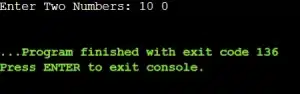
Error Output Of The Real Programming Task

Correct Code:

				
					#include <stdio.h>
int main() 
{
    int a, b;
    // Read Two Integer Values From User
    printf("Enter Two Numbers: ");
    scanf("%d %d", &a, &b);
    // Check Whether The Divisor Is Zero Before Division
    if (b == 0)
        printf("Error: Division By Zero Is Not Allowed.\n");
    else
        // Perform Division Only When It Is Safe
        printf("Result = %d\n", a / b);
    return 0;
}


This is a runtime error because division by zero occurs while the program is running. Although the code compiles correctly, the program crashes during execution.

A condition was added to check whether the divisor is zero before performing the division. This prevents the runtime crash and makes the program safe and reliable.  This shows the importance of input validation in real-world programming.

Correct Output:

Correct Output image of the programming task

Conclusion

“Errors in C Programming” play a crucial role in helping programmers understand the language more deeply.

As programs grow larger and more complex, identifying and fixing errors becomes even more important. By carefully reading compiler error messages and understanding their causes, programmers can write more efficient, reliable, and error-free C programs.

Knowing the error type is only half the job; fixing it correctly matters even more. These Tips for Debugging Common Coding Errors come from real failed submissions and will help you develop a calmer, step-by-step approach when your code doesn’t work as expected.


Key Takeaways:

  • Understanding the different types of errors in C helps you debug programs faster and with more confidence.
  • Compile-time errors occur before execution and are most commonly caused by syntax-related mistakes in the code.
  • Runtime errors appear while the program is running and may crash the program or produce unexpected behavior.
  • Linker errors happen when required functions or files are missing or not properly connected during the linking stage.
  • Logical errors are the hardest to detect because the program runs successfully but produces incorrect output.


Frequently Asked Questions:

1) Can a program have multiple types of errors at once?

Yes, a program can have multiple types of errors simultaneously. For example, it may contain syntax errors, logical mistakes, and even runtime issues all at once.

2) Why does my C program compile but not give the correct output?

If your C program compiles successfully but produces incorrect output, it usually indicates a logical error. This means the program’s instructions are syntactically correct, but the logic or flow of operations is flawed.

3) Are runtime errors always visible?

No, runtime errors are not always immediately visible. Some runtime errors, like division by zero or accessing invalid memory, may cause the program to crash, while others, such as incorrect calculations or wrong data handling, may silently produce wrong results.