If you have just started learning Java Programming, then you might face the NumberFormatException error while solving Java Assignments. However, “Handling NumberFormatException in Java” is not that difficult.
The NumberFormatException is one of the most common errors in Java, which happens when you try to convert a string to an integer. If the formatting of the string is not proper, then such issues can be seen.
In this article, we will first talk about the NumberFormatException and its different causes in Java assignments. Later, we will share some debugging methods to handle this problem easily. So, let us start.
TL;DR: Handle NumberFormatException In Java
Aspect | Summary |
What is the NumberFormatException? | A Runtime Exception that occurs when you are trying to convert an invalid string into a numeric value. |
Common Causes | Converting Non-numeric, empty/whitespace, null, numbers beyond data type range, and invalid radix/base strings to numeric values |
Handling Methods |
|
Real Example | A real Java Assignment Problem Statement with the following:
|
What Is NumberFormatException In Java?
The NumberFormatException is a Runtime Error in Java programming. The Java NumberFormatException can be seen when you are trying to convert a string to any numeric value.
Such issues occur when the formatting of the string is not proper. That means, in the string variable, there are no numeric values present. In those instances, the NumberFormatException in Java Assignments can be seen.
public class Main
{
public static void main(String[] args)
{
String input = "one"; // Contains Invalid Characters
int number = Integer.parseInt(input); // NumberFormatException Will Occur
System.out.println("Converted number: " + number);
}
}
In the example, instead of giving “1” as the input, the “one” has been given. So, the string has no numerical values. If we attempt to convert that string to an integer, a NumberFormatException will occur, as shown below.
Why Does NumberFormatException Error Occur In Java Assignments?
Now, if you are getting a NumberFormatException in your Java Assignment, then there might be many causes behind it. Here, we are going to look at some of the very important and common reasons for such exceptions.
Let us check the following list carefully before moving on to the Handling Tips of Java NumberFormatException.
1. Parsing Non-numeric Strings:
When converting a string to numeric values, if any non-numeric values are present, a NumberFormatException can be encountered as the output. You have to ensure that there are only numbers as strings.
public class Main
{
public static void main(String[] args)
{
// Contains Invalid Characters
String input1 = "one";
String input2 = "one1";
// NumberFormatException Will Occur
int number1 = Integer.parseInt(input1);
int number2 = Integer.parseInt(input2);
}
}
In the above code, we are giving “one” and “one1”. For both of these cases, there will be a NumberFormat Exception. If we have given only “1”, then this error will not come.
2. Parsing An Empty Or Whitespace String:
Suppose you are converting a string to any numeric values, but there are no values present in that string variable. Then, the NumberFormatException will happen as there is no number to convert.
public class Main
{
public static void main(String[] args)
{
// Contains Empty Or Whitespace
String string1 = "";
String string2 = " ";
// NumberFormatException Will Occur
int number1 = Integer.parseInt(string1);
int number2 = Integer.parseInt(string2);
}
}
In the above example, the String1 is the Empty String, but the String2 has a Whitespace there. Both strings will be rejected, and for both strings, the NumberFormatException will occur.
3. String With Null Reference:
For many purposes, we start a string variable with a NULL Reference and later, we provide values. If we share that NULL String for conversion to a numeric value, the NumberFormatException is imminent.
public class Main
{
public static void main(String[] args)
{
// Contains NULL References
String zap = null;
// NumberFormatException Will Occur
int number = Integer.parseInt(zap);
}
}
In the above example, the ‘Zap’ String has a Null Reference. And when we are trying to convert it into a Numeric Format, the code will stop execution by showing the NumberFormatException.
4. Too Large Number In Strings:
Sometimes, we think that, as we are sharing numbers as a string, we can share numbers as long as possible. But the NumberFormatException can happen there because it is going outside the Valid Range of Data Types.
public class Main
{
public static void main(String[] args)
{
// Contains Too Large Value
String zap = "999999999999";
// NumberFormatException Will Occur
int number = Integer.parseInt(zap);
}
}
In the above example, we are sharing “999999999999” as the string value. It is beyond the range of int in Java. That is the reason we are getting an error for that line.
5. Conversion Of Invalid Radix Base:
In your assignment, if there is any Binary or Hexadecimal problem, then using Radix Base is necessary. However, if the Radix Base has some alphabetic values, then the conversion will create a problem.
public class Main
{
public static void main(String[] args)
{
// Contains Invalid Radix Base
String zap = "45AB";
// NumberFormatException Will Occur
int number = Integer.parseInt(zap, 10);
}
}
Here, in the string variable, we are giving the string value “45AB”. The A and B are not decimal values. So, for that reason, the NumberFormatException will happen.
What Are the Ways To Handle Java NumberFormatException In Assignments?
Now, god forbid, if any NumberFormatException happened in your Java Assignments, then you don’t have to worry about it, as there are multiple ways to handle the NumberFormatException in Java.
In this section, we will let you know 3 different handling methods of Java NumberFormatException.
1. Check Input String With Print Statements:
Whenever you are taking any input from any user, don’t blindly rely on the input data. Before converting it to any numeric format, you have to check the input data. And to do so, the Print Statement can be used.
In the following code, we have demonstrated the use of the Print Statement for checking input values.
Public class Main
{
public static void main(String[] args)
{
String zap = “ 123 “; // Given String Value
System.out.println(“Raw Input: [“ + zap + “]”); // Printing Input Data
int one = Integer.parseInt(zap); // NumberFormatException Will Happen
}
}
Explanation Of The Program:
- An input string has been taken where some whitespaces are present at the beginning and at the end. To get more knowledge about strings, you can attain some knowledge about comparing strings in Java.
- Now, we will first print the raw data using Println.
- Later, we will move on to String Parsing. However, this will cause a NumberFormatException. But after seeing the raw input data, you can understand the cause and fix it.
Output:
2. Cut The String Using Trim() Method:
Now, if there is a string value where some whitespace-related issues are present, then the Trim() Method can be used to filter them. Using a whitespace string for numeric conversion will cause a NumberFormatException.
General Syntax: StringName.trim();
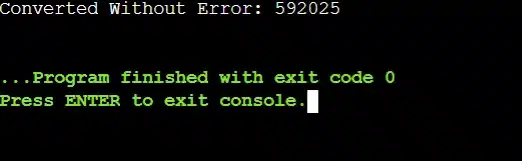
Let us check the following code, where the use of the Trim() Method is shown for a sample string.
Public class Main
{
public static void main(String[] args)
{
String zap = “ 592025 “;
zap = zap.trim(); // Removing Extra Spaces
int one = Integer.parseInt(zap); // Converting To Integer
System.out.println(“Converted Without Error: “ + one); // No NumberFormatException
}
}
Explanation Of The Program:
- A sample string value where whitespace is present at the beginning and at the end will be taken.
- Now, the Trim() method will be used just like the syntax shown.
- Now, if we convert the new string value to an integer, it will not create any NumberFormatException error.
Output:
3. Use Try-Catch Block:
If any one of the above-mentioned methods is not helping you, then it is time to implement the Java Try-Catch Block. NumberFormatException caused by whatever the reason can be fixed with the following method.
Go through the following code snippet to understand the use of the Try-Catch Block in this regard.
Public class Main
{
public static void main(String[] args)
{
String zap = “onetwoAB”; // Wrong String Value
try // Starting Of Try-Catch Block
{
int one = Integer.parseInt(zap); // Converting To Integer
System.out.println(“Converted Integer: “ + one);
}
Catch (NumberFormatException e) // If The Exception Occurs
{
System.out.println(“Input Is Not A Valid Integer: “ + zap);
}
}
}
Explanation Of The Program:
- A sample string value has been taken where Alphanumeric Values are present.
- We will start the Try Block, where we will try to convert the string data to a numeric value, which is not possible.
- As the NumberFormatException will happen here, the Catch Block will be executed.
- It will show the error message and print the input string data from which the problem has arisen.
Output:
Key Takeaways:
- NumberFormatException occurs when we try to convert a string to a numeric value.
- NumberFormatException is a Runtime Exception or Unchecked Exception.
- Due to Non-numeric, Empty, Null, Large Strings, etc., the NumberFormatException can happen.
- We have to validate every input data, trim strings, and use a Try-catch block to remove such issues.
It is advisable to clear the basic concept of the Java programming language. Otherwise, some of the implementation processes will look weird to you. If you get a good grip on this topic, you can bring some more important Final Year Java Project ideas for your group.
FAQs (Frequently Asked Question by Students)
You can avoid Java NumberFormatException by validating the user inputs. Also, you can use the Trim() method to remove whitespaces from a string, and lastly, the Try-Catch block to deal with such exceptions.
The NumberFormatException can be seen during the use of methods like Integer.parseInt() or Double.parseDouble(). If Non-numeric, Empty, Null, etc., strings are used for this, then issues can be seen.
The NumberFormatException is an Unchecked Exception. That means, it is a Runtime Exception. This exception is tapped during the execution of any Java code, not at the time of compilation.


