In the Python Programming Language, you might have learned the File System, Data Structures, Dictionaries, etc. However, do you know that there is a concept present as “Python Pickle Module”?
When you just start your Python Programming Language course, you start getting some weird & new concepts in front of you, that fall under the Advanced Level in Python. The Python Pickle Module is a similar type of concept.
This article will discuss what the Pickle Module in Python is, along with some more in-depth concepts that will help put a step ahead in the Advanced Level Python Course.
TL; DR: Pickle In Python
Aspect | Summary |
Definition | Pickle is a Python module that is used to serialize objects into byte streams and deserialize them back. |
Serializing and Deserializing | Pickling (Serializing) converts objects to bytes, while unpickling (Deserializing) restores the original Python objects. |
Supported Data | All the built-in types, collections, and top-level classes and objects can be pickled in Python. |
Process With File | The Dump() and Load() functions are used respectively to store and retrieve pickled data from files in binary mode. |
Process Without File | The Dumps() and Loads() functions are used respectively to Serialize and Deserialize objects in memory without files. |
What Is Pickling In Python Programming Language? Read Below
In the Python Pickle Module, a Python object is being changed to other formats for some reason. Pickle in Python Programming Language helps to either convert the object into a byte stream & store it in the memory or file. Sometimes, it can be stored without the file.
The pickle Python module is used to serialize and deserialize any object declared in the Python programming language.
Now, you might be thinking, “Serializing and Deserializing”? Let us first clear this concept for you.
What Is The Serializing Process In Python Pickle?
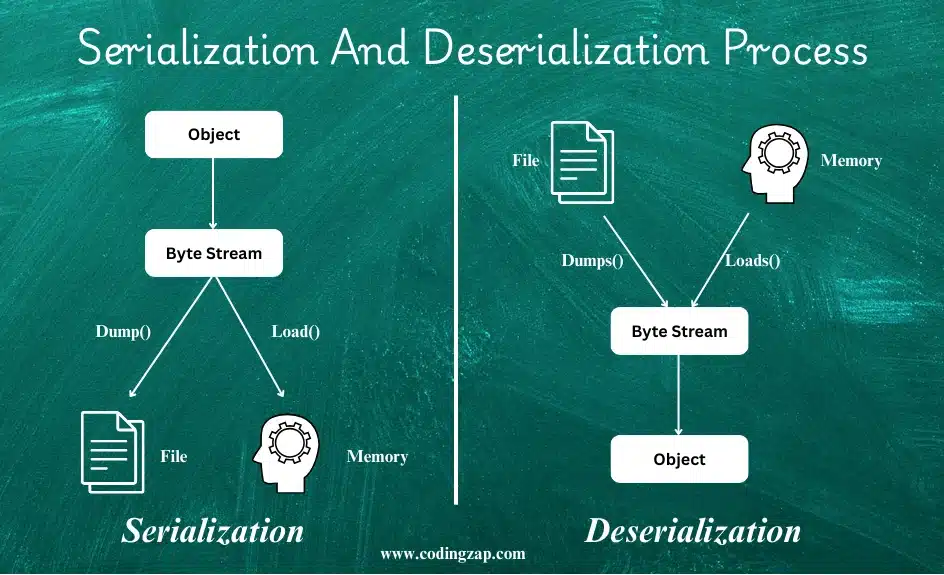
On the internet, much data or instructions are transferred to the client or the server many times. At that time, some code or instructions need to be sent. Those instructions are serialized first. That means that the object or the code (for your simple understanding) will be converted to a byte stream.
Byte Stream is the lowest & easiest code that can be decoded. And then, those instructions are shared with any file, memory, or database on the internet. This process is known as Serializing.
What Is The Deserializing Process In Python Pickle?
And the Deserializing is the opposite of the Serializing. Here, the byte streams that are stored in the memory will be converted to the full object or code. While Deserializing, Pickle in Python again creates an instance of the object.
The use of the Pickle Python module is very restricted in the deserialization process. It is highly done in the Serializing process. The pickle module in Python needs to be implemented properly. Otherwise, potential threats are caused by it.
What Are The Pickle Protocols?
After knowing about serializing and Deserializing, it is time to have a look at the Python Pickle Protocols. The Pickle Protocols in Python are a set of rules and formats that need to be followed in Serializing and Deserializing.
When we are converting Python objects into a byte stream, these Pickle Protocols are followed. There are multiple Pickle Protocols present, like the following:
- Protocol 0: Protocol 0 is the protocol that is rarely used nowadays, as it is very slow. This is the first original protocol and is presented in a human-readable format.
- Protocol 1 & 2: After Protocol 0, Protocol 1 & 2 were introduced. This is a much better version than Protocol 0. It follows the Binary Format.
- Protocol 3: Protocol 3 was introduced with Python 3. We can say, this is the first modern Protocol. The Protocol 3 can efficiently handle the byte stream.
- Protocol 4: If you want to perform faster Serializing and Deserializing, then Protocol 4 will be the best choice. It can support very large Python objects as well.
- Protocol 5: This is the latest protocol that comes with the Python 3.8 version and newer ones. It can optimize large data and give memory efficiency.
What Are Some Built-In Methods In Python Pickle?
Serializing and Deserializing are processes that can be done with the help of some built-in methods. With the Pickle Module in Python, we can access some important API references.
It is necessary to know about those most commonly used APIs for Serializing and Deserializing before we move ahead. Let us check them in the following list:
- Dump(): This API helps to write a Python Object to a file in a byte stream or pickled format.
- Load(): It is the opposite of Dump(). It reads the pickled object from a file and recreates the original one.
- Dumps(): It also converts a Python Object to a byte stream but stores it in memory instead of the file.
- Loads(): It converts the Pickled Object stored in memory to the original one instead of the file.
- HIGHEST_PROTOCOL: This helps to find the latest protocol and use it in the program.
- DEFAULT_PROTOCOL: Whatever the current Python version is, the default protocol will be used.
What Are The Tips To Handle Pickle In Python Programming Language?
Now, as we have an ample amount of knowledge about pickling in the Python programming language, we can easily discuss some tips about the pickle Python module. Using the Pickle in the Python Programming Language is not an easy task.
As this concept is highly related to the internet concept, we need to be very careful while handling the pickle Python module. While doing deserialization, the source of the byte stream might not be an authentic one.
In those cases, some virus or harmful element can be inherited in the code that will be converted in the deserialization process. So, for that, we need to remember some tips. Let us try to find out some effective tips while programming using the Pickle Python module.
- The client or server that is involved in the pickle interaction needs to be trusted. Otherwise, some malicious data will have the right to change the code or object structure remotely. This is known as Remote Code Execution.
- While doing Pickle in the Python Programming Language, an encrypted network connection is a must. Both the server and the client handling party should be connected to the encrypted network. Otherwise, alternation of the data can be possible.
- If, in any case, the encrypted network is not available, then the signature will be used. Before serializing, one signature will be provided to it. And after deserializing, the signature will be verified again. If it is the same, then there is no issue.
- The file or the virtual system where the pickled elements are stored needs to be maintained every time. If there is any loophole present that needs to be sorted out immediately.
- Protected access to the data & file system review should be done before using Pickle in the Python Programming Language. If the process is done without the internet, then there is no need for much more caution.
We should clear the security concept in our minds before moving to the implementation of the Pickle in the Python Programming Language. But before moving to the implementation process, we will focus on some of the advantages of using Pickle in the Python Programming Language.
What Are The Advantages Of Pickle in the Python Programming Language?
After discussing what pickling is in the Python programming language, you might feel motivated to jump into the implementation process.
But, as we have discussed the tips & dangers of the Pickle in Python Programming Language, you might feel demotivated & scared about the cautions of this process. But let us again grow your interest in this topic when we discuss some of its important advantages.
Let us try to focus on the following points of the advantages of Pickle in the Python Programming Language:
- Pickle in Python Programming Language remembers the object or code that was earlier serialized. So, when it is again serialized, it will easily convert it. So, the reference of the article will be the same.
- The pickle module in the Python programming language will share the object only once. And the reference to that object will be shared in different places. It can also do self-referencing.
- The pickle module will transparently change the class definition of the object while Deserializing. The instances of the class will be stored in the same module on the internet.
How To Use Pickle In Python? Read Below
Now that the concept of the Pickle in Python is clear to you, let us move on to the core concept of the article. Here, we are going to implement the Python Pickle Module with a different approach.
Let us first try to understand the implementation process with the file. After that, we will implement the Python code for the process without using files.
Method 1: Implement Python Pickle Module With A File:
Here, the file concept will be used to implement the program. You should know about the files in the Python programming language. All the modes to open a file or the process to close the file will be needed here. So, you should clear that concept before moving to the implementation process.
Also, other than the File Concept in Python, the Dictionary Concept is being used in the following program. So, the overall basic Python programming course needs to be completed before coming to this topic.
Import pickle # Importing Pickle Module
def storeData():
C = {'key': 'C', 'name': 'C Program'} # Assigning Data
Java = {'key': 'Java', 'name': 'Java Program'}
# Database Creation
db = {}
db['C'] = C
db['Java'] = Java
dbfile = open('ex', 'ab') # File Opening Using Binary Mode
pickle.dump(db, dbfile) # Putting Data
dbfile.close() # Closing Data
def loadData():
dbfile = open('ex', 'rb') # Again Opening File
db = pickle.load(dbfile) # Loading Data
For keys in db:
print(keys, '=>', db[keys]) # Printing Data
dbfile.close() # Closing File
if __name__ == '__main__':
storeData()
loadData()
Steps of The Program:
- At first, the pickle module needs to be imported into the program.
- After that, we are going to implement two different dictionaries that will be developed. We have to share some data with those dictionaries.
- Then we need to again declare some dictionaries that will be used as the database.
- After that, we need to open a file using the file open concept.
- Pickle in the Python Programming Language has some built-in functions. Here, we are going to use the dump() function to store the data in the file.
- The data will be stored in a byte stream manner. This file will be used again in the following steps.
- The file needs to be reopened in the program. The file will be loaded into the program.
- The Pickle in the Python Programming Language converts the same byte stream to the original content easily.
Let us try to understand the output of the above code. It will help to understand Pickle in the Python Programming Language using files.
Output:

Method 2: Implement Python Pickle Module Without A File:
Here, the process is moreover the same as the above-mentioned process. Here, the file will not be used & a local variable will be used to store the data. Also, we need to declare some dictionaries & provide some data to those dictionaries.
Let us check the detailed article & the steps to understand the complete implementation process.
C = {'key': 'C', 'name': 'C Program'} # Assigning Data
Java = {'key' 'Java', 'name': 'Java Program'}
# Database Creation
db = {}
db['C'] = C
db['Java'] = Java
b = pickle.dumps(db) # Local Variable Storing
myEntry = pickle.loads(b) # Loading The Variable
print(myEntry) # Printing The Data
Steps of The Program:
- At first, again, we are going to import the Pickle Module into the program.
- Now, two different Dictionaries will be opened along with some key and value pairs.
- Then we need to again declare some dictionaries that will be used as the database.
- Now, using the Pickle Dumps Method, we are going to store the Local Variable in code.
- Now, using the Loads() Function, the variable will be loaded after Deserializing.
- Now, we are going to print the new data.
Let us try to understand the output of the above code. It will help to understand Pickle in the Python Programming Language without using files.
Output:

Still, wondering how this works? Feel free to seek guidance from a group of skilled professionals at CodingZap if you’re curious about how this operates. Our Python Homework Assistance provides expert support for Python programming assignments and projects.
How Students Can Update Pickle Files In Python?
As you now understand the process to declare Pickle in Python, we can move ahead to a more difficult question. Do you know, the Pickle File can also be updated as per the need? And to do so, another Byte Steam Package will be used.
Suppose a byte of data is being transferred to one IP address, and now you want to update the data. To do so, there is no need to stop the process. With a simple alteration of the data, you can achieve your target.
import pickle # Importing Pickle Module
from io import BytesIO # Using BytesIO Module
zap = {'Coding': 'ZapOne', 'Python': 'OOPs'} # Dictionary With Values
bff = BytesIO() # Calling BytesIO
pickle.dump(zap, bff) # Changing To In-Memory Buffer
bff.seek(0) # Resetting Buffer Position To Start
new = pickle.load(bff) # Unpickle Data To Update
new['C++'] = 'OOPs' # Updating Data
print("Old Data: ", zap) # Printing Old Data
print("Updated Data: ", new) # Printing New Data
Steps of The Program:
- At first, the Pickle Module should be imported into the program. Later, the BytesIO Module will be imported to change data to a byte stream.
- Now, one dictionary will be created along with some Key-Value pairs.
- Now, the BytesIO function will be called & the entire data will not be converted.
- It is time to add new data to the set. We will add the C++ value to the Dictionary.
- At last, we are going to print the New Value as well as the Old value to get the difference.
Output:
How To Read Pickle In Python Homework And Assignments?
Now, if you have asked to only read some pickle values in the Python assignment, how can you do that? Whatever we have declared so far, the answer is kept there only. However, we will highlight the process here with a simple example.
You have to remember that the Pickle can only read the Byte Data. You can force the Python Pickle to read a complete string of data. By keeping that in mind, we are going to establish a Python Code.
import pickle
data = pickle.dumps("CodingZap") # Getting Bytes Data Of String
new = pickle.loads(data) # Reading The Data
print("Loaded Data:", new) # Printing The Data
Steps of The Program:
- At first, we will import the Pickle Module in the code to use different functions.
- Now, using the Dumps() Function Module, we are going to change the CodingZap Text to a Byte Stream.
- Now, the Loads() Function will be used to read the Byte Data.
- At last, we are going to print the converted Byte Data for easy understanding.
Output:

What Can’t Be And Can Be Pickled In Python Assignments?
In Python assignment problems, every element cannot be pickled. There are many other elements present, where if you are going to put the Pickle, it will prompt an error. So, the elements where the Pickle in Python can’t be used are the following:
- Lambda Function
- Nested Function
- Class
- Modules
- Methods
- Large Objects
Let us make a list of all the possible data types where pickle can be done. The list of data types is as follows:
- All the Boolean Data Types that are present in your Python homework can be pickled. This means that the pickle Python module can be implemented in the True & False Boolean values.
- Now, the most used data types can also be pickled in the Python programming language. Pickle in the Python Programming Language can be used in the Integer Data Type also. Along with that, long & float numbers can also be pickled there.
- All Types of Strings can be used in the Pickle in the Python Programming Language. That may be a Unicode string & normal string.
- Different Types of Data Structures that are aligned to the Python programming language also come under the Pickle Python Programming Language. Like the List, Tuple, and Dictionary & Set data structures, they can be pickled in a programming language.
- Other than those, any type of function can be pickled in the Python programming language.
Comparison Table Between Pickle And Other Serializing Formats In Python:
Along with the Pickle, there are some other Serializing Formats as well in the Python language, like JSON, Marshal, and Dill. Let us compare them to find out the better one.
Criteria | Pickle | JSON | Marshal | Dill |
Readability | Binary | Text | Binary | Binary |
Language | Python | Multi | Python | Python |
Security | Unsafe | Safe | Unsafe | Unsafe |
Speed | Fast | Medium | Very Fast | Medium |
Portability | Low | High | Low | Low |
Why Can't Students Pickle All Objects In Python?
In the above case, we have just declared that Python can work on objects. However, if any object is a large one, then the Pickle can’t be used there. And for some small objects as well, the Pickle can’t be used.
So, in Python, not every object is suitable for pickling. Here, we are going to highlight some reasons why you might not pick every Object in Python for pickling.
- Not all object types are suitable for Pickle. Like Object with File Handle, Network Connections are not suitable for Pickle there.
- In the Object, if some references create a loop, then a circular reference will exist there. In such cases, you can’t pickle them.
- If any External Dependencies exist, the Object can’t be picked up. The C Extension or the object that uses a third-party library will not be suitable.
- Pickle is not always suitable in all Python Modules. There might be a situation where the Pickle is not working on a proper Python Version.
- Pickle might not be suitable for all cases. If you try to unpickle any data from the untrusted source, then it could warn you not to do so.
Why Is Pickle Used In Python?
As we have discussed the tips & dangers of the Pickle in Python Programming Language, you might feel demotivated & scared about the cautions of this process. But let us again grow your interest in this topic when we discuss some of its important advantages or reasons to use Python Pickle.
Let us try to focus on the following points of the advantages of Pickle in the Python Programming Language:
- Pickle in Python Programming Language remembers the object or code that was earlier serialized. So, when it is again deserialized, it will easily convert it. So, the reference of the article will be the same.
- The pickle module in the Python programming language will share the object only once. And the reference to that object will be shared in different places. It can also do self-referencing.
- The pickle module will transparently change the class definition of the object while Deserializing. The instances of the class will be stored in the same module on the internet.
Conclusion:
As we saw it is very important to understande “Python Pickle Module”.
We need to first clarify our concept of pickling in the Python programming language. Then the rest of the article will become an easy one.
It is advisable to clear the basic concept of the Python programming language. And having a good knowledge of computer networks will be an extra edge to get the topic more easily. It will help us in the future.
So, hope you have liked this piece of article. Share your thoughts in the comments section and let us know if we can improve further.
Key Takeaways:
- Serializing and Deserializing are two major pillars of the Pickle Module.
- The serialization converts the String data to the Byte Stream for transportation.
- The Deserializing converts the Byte String Flow to the normal format for printing.
- The Dumps() & Loads() are two major functions in the Pickle Module.
- The Read & Write operations are needed for Files to work on Pickle.
FAQs (Frequently Asked Question by Students)
Pickling is the process by which a Python object gets converted into a byte stream. Whereas, the Unpickling is the opposite of it, where the byte stream gets converted into the original Python object.
Every basic data type in Python, like the integers, floats, strings, Booleans, etc., can be pickled in Python. Along with some of the collections like list, tuple, set, dictionary, etc., they can also be pickled.
Pickle can execute arbitrary code during Deserialization. So, when we are unpickling data from an unknown source, it can bring serious consequences and security concerns to the code.


