

Steps Of The Program:
- First, provide the original string as the input string in the Python program. The string data will be printed in the program.
- Now, the replace() function will be implemented. Provide the character as the first argument that should be changed to another character. And provide the new character as the second argument to the function.
- The replace() function accepts the arguments & removes all the occurrences of the character along with the new one. Now, the new string data will be printed inside the program.
Output:

The output of the program helps to find out if the replacement string is now a new string that has been converted. Whatever the original string is, using the replace() function, the new string can be developed by removing all occurrences.
How To Replace Multiple Characters In A String Using Re.Sub() Function
In Python, one powerful way to replace multiple occurrences of characters in a string is by using the sub() function from the built-in Regular Expressions (re) module.
While the replace() method works well for simple replacements, ‘re.sub()’ is more flexible and efficient when you are performing the following operations:
- Replacing multiple occurrences at once
- Matching patterns instead of exact characters
- Replacing different variations of text using a single rule
General Syntax: re.sub(“present character”, “replacing character”,string-name)
The re.sub() function uses regular expressions (regex), which are special character sequences that define search patterns. These patterns allow you to locate and replace specific characters or groups of characters within a string.
Steps Of The Program:
- Import the necessary “re” module into the program to use all its components.
- Now, declare an empty string & provide some value to it. It will be the original string that will be used in the program.
- Now, we will use the syntax of the function. We will provide all the arguments needed there. The first two will be the characters & the last one will be the string name.
- Now, the new string data will print in the program. So, we will get the changes in between them.
Output:

From the output, we can see that the character has been changed in the replaced string. The characters that we have provided in the program are now present in the original string. So, the replacement of the characters is performed correctly.
How To Replace Multiple Characters Using Translate() & Maketrans() Functions?
In Python, the translate() and maketrans() string methods work together to efficiently replace or remove multiple characters in a string.
These functions use a translation table, which maps one character to another. Instead of calling replace() multiple times, you can define all character mappings at once and apply them in a single operation.
The Maketrans() creates the translation table or simply the mapping rules. And the Translate() applies the translation table to the string.
General Syntax: string-name.translate(string-name.maketrans(“present character”, “replacing character”))
This method is especially useful when you need to:
- Replace multiple different characters at once
- Remove specific characters from a string
- Perform fast character-by-character substitutions
Steps Of The Program:
- Declare a string variable & provide some value to it, which will be used inside the program.
- Now, the original data will be printed in the program to show the difference among the replacement strings.
- Now, following the above syntax, the translate() & maketrans() functions will be implemented. We should provide the character that should be replaced with another one.
- Now, the new data will be printed in the program. Hence, we can get the differences.
Output:

How To Replace Multiple Characters Using List Comprehension Method?
In Python, list comprehension provides a clean and readable way to transform data using iteration and conditional logic. Although it is commonly used with lists, it can also be applied to strings, since strings are also iterable.
Steps Of The Program:
- Declare the string variable along with some values to it & print the data in the console.
- Now, we should use the above method syntax inside the program to make the changes in the string. If the character is present, it will be changed. In the other case, the else function will be used.
- Now, the changed data will be printed in the console. Now, we will notice the difference present there.
Output:

The output clearly shows that the replacement of the characters is done completely. Whenever the character appears in the string, it is now replaced with the provided string value. Hence, the program was executed successfully.
How To Replace Multiple Characters In A String Using Dictionary Values?
In Python, a dictionary is a built-in data structure that stores data in key and value pairs. Each key is unique and maps to a specific value. Let us check a basic dictionary example.
Steps Of The Program:
- Declare the string value that will be used in the program. Also, the data will be printed in the console.
- Now, describe one dictionary along with the key & value inside of that. Place the character that will be replaced as the key. And the value will be the replacing character.
- Now, according to the syntax, call the function. We will use the space to join the string value. The data will be saved in one variable.
- Now, the new values will be printed in the console. So, we will get the difference between the two datasets.
Output:

From the output, we can see that the string “eeeeee” is replaced with the new string “vvvvvv”. Here, in the dictionary, we have marked the character ‘e’ to be replaced with the character ‘v’. The operation is successful.
Comparison Table Between Different Methods For Replacing Multiple Characters In Strings:
Now, we have checked all the methods to replace multiple characters in Python strings. As your mentor, I will create a comparison table between them, which will help you to understand their differences. Let us check it.
Criteria | Replace() | Re.sub() | Translate() | Comprehension | Dictionary |
Replacement | Sequential | Pattern | Direct | Iterative | Mapped |
Complexity | Simple | Advanced | Moderate | Moderate | Moderate |
Performance | Slow | Medium | Fast | Medium | Medium |
Flexibility | Low | High | Low | High | High |
Readability | High | Medium | Medium | Medium | Medium |
How Students Can Count Occurrences Of Multiple Characters In Python Strings?
Sometimes, in exams, students are asked to count the occurrences of multiple characters rather than replacing them. I have seen this pattern multiple times and decided to teach students its solution along with the replacement technique.
Here is a simple but effective solution to the query. First, check the general syntax of the ‘count()’ function.
General Syntax: string-name.count(‘charcter’)
Steps Of The Program:
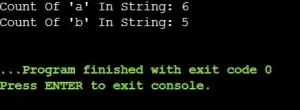
- A string is declared where two characters are placed repetitively.
- One variable count1 is declared to store the appearance of the character ‘a’.
- Another variable, count2, is used to keep the occurrence of the character ‘b’ using the above syntax.
- Now, we will print the value of each variable, count1 & count2.
Output:
When Should You Use Which Multiple Characters Replacing Method In Python?
When students learn multiple ways to replace characters in Python, the biggest confusion is not how to write the code, but which method they should choose.
I have seen this many times while mentoring beginners. The truth is, each method has its own purpose. If you understand the situation clearly, choosing the right one becomes very easy.
Here is how I guide my students; this will also help you to find the best one.
- Use replace() when you want a simple and direct replacement of the same character or word throughout the string.
- The re.sub() should be used when the replacement depends on a pattern, not just one fixed character, such as removing all digits.
- Avoid using re.sub() for very simple replacements, because regular expressions add extra overhead and make the code harder to read for beginners.
- Use translate() with maketrans() when you need fast bulk replacement of multiple different characters in one go.
- Go for dictionary mapping with join() when different characters need different replacements.
- The list comprehension is used when you want to apply a condition while replacing characters, such as replacing only uppercase letters or only specific matching characters.
Expert Tip: The key lesson I always share is to write code that is not just working, but also readable and easy to maintain. Clean code is more important than clever code.
What Are Some Real-World Applications Of Replacing Multiple Characters In Python Strings?
While teaching students about replacing multiple characters in Python strings, they often develop a mindset that this technique is only useful for educational purposes.
If you are assuming this same thing, then this section is for you, where I will list some real-world applications of it.
- To clear the user inputs by removing the unwanted special characters and all, this operation is used.
- To normalize the text data, this operation is used before storing it in any database.
- In CSV or Log Files, it helps to remove multiple delimiters with any other character.
- In Natural Language Processing, this operation helps to remove punctuation from sentences.
- This operation helps to mask the sensitive characters in emails, phone numbers, or IDs.
Common Mistakes Students Make While Replacing Multiple Characters In Python:
Over the years, I have noticed that students often struggle not because the topic is difficult, but because they overlook small details and commit some common mistakes.
Let me highlight the most common mistakes I see during code reviews and mentoring sessions.
- Many students forget that strings are immutable in Python, so they expect the original string to change without storing the result in a new variable.
- Some students use replace() repeatedly in a loop when a single translate() call would be cleaner and faster.
- Using re.sub() without understanding regular expressions properly is another common mistake, which often leads to unexpected replacements or wrong patterns.
- Students sometimes forget that replace() is case-sensitive, and they get confused when uppercase and lowercase letters behave differently.
- While using dictionary mapping, many beginners forget to handle characters that are not present in the dictionary, which can cause logical errors if not written carefully.
Mentor Advice: If you want to avoid these issues, always test your code with different inputs. Do not just test one simple example.
