Many students first encounter “Inline Functions in C” while preparing for lab exams or debugging linker errors in multi-file programs.
Although the concept seems simple, inline functions often behave differently than expected, which leads to confusion during assignments.
In this article, we will discuss the Inline Function along with its different types. Additionally, we will use the C language to demonstrate, through practical examples, how the Inline Function Call works. Let’s begin our discussion.
TL;DR: Inline Function In C
Aspect | Summary |
Definition | An inline function is a small function that the compiler may replace with the function’s actual code. This helps reduce function call overhead. |
Compiler Control | The inline keyword is only a request and does not guarantee inlining. The compiler decides based on function size, complexity, and optimization settings. |
Static Inline | A static inline function has internal linkage and is limited to the current translation unit. This approach reduces linker errors and is safer for multi-file programs. |
Extern Inline | An extern inline function allows access across translation units. It requires careful handling to avoid linker issues and is mainly used in library design. |
Inline Vs Normal | Inline functions reduce function call overhead by code substitution. Normal functions are better suited for large or complex logic. |
What Is An Inline Function In C Language?
An inline function in the C language is a small function used to replace a function call with the actual code of the function. Whenever the inline function is used, the compiler tries to perform this operation.
If the Inline Function is used, then the compiler may insert the function’s code directly at the place of calling instead of jumping to another memory location during a function call.
This can reduce function call overhead when the function is short and used many times. Here is the syntax.
inline return_type function_name(parameters) {
// function body
}
The inline keyword is only a request to the compiler, not a command. The compiler may ignore it if the function is too large or complex. From an academic perspective, inline functions are mainly used to understand compiler optimization concepts rather than as a mandatory coding technique.
Why Students Get Confused About Inline Functions In C?
- Many students assume that using the inline keyword guarantees faster execution, which is not always true.
- Beginners often struggle because inline functions may work on one compiler but produce linker errors on another.
- Students misunderstand that inline functions can increase code size instead of reducing it, which opposes what is usually taught about optimization.
- Students expect inline functions to behave differently from normal functions at runtime, even though both produce the same output.
- Linker errors caused by missing static or extern keywords make students think their logic is wrong.
How To Use Inline Keyword In Program? Read Below
Now, that the concept of Inline Functions has become clear to you, we can proceed with the practical implementation process. Here, the implementation defined is using the above syntax and going to face an error. So, let us check the whole program below.
#include // Declaration Of Standard Refers of Header File
inline int zap(int a, int b) // Declaration Of Function Inline
{
return a+b; // Inline Function Body
}
int main() // Main Function
{
int one = zap(2,3); // Inline Function Call
printf("The Result: %d", one); // Printing Of Result By Compiler
return 0;
}
Steps Of The Code:
The Inline Definition of Function Add() is done with the help of the Inline Keyword.
Inside that function, the Return Value is set to return the Result to the main function.
From the Main Function, Inline Function Calls will be performed.
At that same step, the compiler will perform inline substitution of the entire function’s code.
And at last, we are trying to print the value.
Output:
From the above output, we can see we are getting an Error Message on the screen. Here, the function declared in the code is working completely fine. However, as this is the Inline Function, the Add() Function is getting copied in the Main Function during Function Calls.
Hence, the Add() Function becomes the Non-Inline Function. That is the reason, we are getting the error.
What Are Two Types Of Inline Functions To Escape Errors?
Now, in the above section, you have seen how In-line Functions are becoming a Non-inline definition in the Usual Function (Main Function). Hence, we are getting an error which is not accepted. So, what will be the strategy where all the declarations of the storage class will not marked as Non-Inline?
If you don’t want to get errors, you have to use the Specifier as soon as you mention inline. There are two types of Specifiers present, hence, we can say there are two different types of In-line Functions present. Let us check them in the following section.
Static Inline Function Call: Static Functions are the special method that helps to make the entire source code written in the function as the Static. This makes the variables declared in the function executable in the Main function or somewhere else it is being called by the compiler.
Non-Static Inline Function Or Extern Inline Function Call: Here, the external definition will work. We have to use the Extern Keyword in this section this will make the entire code size available to access from the outside of the code.
How To Implement Static Inline Functions In C Language?
Now, we have seen how we are getting errors when we are simply using the Inline Functions. Now, it is time to use the Static Keyword to check the output. So, let us have a look at the following code and know how the C Compiler works here.
This approach is recommended for students because it avoids linker errors while keeping the code easy to understand and debug.
#include // Declaration Of Standard Header File
static inline int zap(int a, int b) // Function Inline Declaration
{
return a+b; // Returning Addition Value Of Static Variables
}
int main() // Main Function
{
int one = zap(3,20); // Calling Inline Function
printf("The Static Inline Result: %d", one); // Printing Of Result By Compiler
return 0;
}
Steps Of The Code:
At first, the definitions of the Inline Function along with Static are completed.
Inside that function, some evaluation will be done and the value will be returned.
Now, the definitions of the Main Function will be done where we will Call Site.
At last, we will try to print the values in the output.
Output:
Now, you can see that the output is coming into the screen as we want. So, the program execution is completed and we have successfully debugged the Inline Function Call Error in the above-mentioned program with a simple Static Inline Keyword.
How To Implement External Inline Functions In C Language?
Now, after the Static, we will move to the External Definition. In normal cases, the definitions of Extern Keyword don’t go with the Inline Keyword. So, if you use an Extern Keyword with the Inline Function, it will become a normal function. To make an Extern Function an Inline one, you have to use one trick.
Warning: Students should use extern inline only after fully understanding translation units and linkage, as incorrect usage commonly leads to undefined reference errors.
#include
extern int zap(int a, int b); // Defined Of External Function Without Inline
int main() {
int one = zap(5, 14); // Providing Values
printf("The Extern Inline Result: %d", one);
return 0;
}
int zap(int a, int b) { // Defined The Same Function For External Definition
return a + b; // Addition Of Result By Compiler
}
Steps Of The Code:
At first, the definitions of Extern Function will be done without using the Inline() Keyword.
Now, inside the Main Function, the values are provided to the function for execution.
We will print the result in the Main Function.
At the end, the Normal Function will be declared with the same name.
Output:
From the above output, we can see that the result is coming usually as it comes. So, the Extern Keyword works as per the need of the code. So, the Inline Extern Function execution completes with the result.
Comparison Table Between The Static Inline And Extern Inline Function:
In Inline Function assignments and homework, it has sometimes been noticed that comparisons between Static and extern inline functions have required students to review their theoretical knowledge of them.
To answer that question in your exam, you have to go through the following table.
Criteria | Static Inline Function | Extern Inline Function |
Linkage | Internal | External |
Visibility | Local | Global |
Safety | High | Moderate |
Usage | Headers | Libraries |
Errors | Fewer | Possible |
Comparison Table Between The Inline Functions And Normal Functions:
Our expertise says that another comparison table has a great chance of being asked in your exam, which is the comparison table between the Inline and Normal functions. Here is the table that you can remember.
Criteria | Inline Function | Normal Function |
Execution | Substitution | Call |
Speed | Faster | Slower |
Memory | Larger | Smaller |
Debugging | Harder | Easier |
Usage | Small | General |
Practical Use Cases Of Inline Functions In Real-World C Programming:
I have noticed that students often misunderstand that the Inline Functions are only for the educational section. But we have to make them understand that the list of Practical Use Cases of Inline Functions is quite long.
These use cases help students connect classroom theory with real-world programming practices.
- Inline functions are used in embedded systems to reduce function call overhead in time-critical operations.
- They are helpful in mathematical utility functions, such as simple calculations that are called repeatedly.
- Inline functions are widely used in header-only libraries to improve readability while maintaining performance.
- Inline functions are often preferred over macros in real projects because they provide type safety.
- They are useful in low-level system programming where efficiency and execution speed are closely monitored.
Advanced Concepts: What Is a Translation Unit in an Inline Function?
Now, after discussing all of the implementation processes, we have to move to the discussions on the Translation Unit before wrapping up the topic. Understanding the Translation Unit is essential to explaining the behaviors of Functions in different files.
A translation unit is the final source file that the compiler works with after all preprocessing steps are completed. Inline functions are commonly defined in header files when used across multiple source files.
In simple terms, each .c file, along with its included headers, becomes one translation unit during compilation. Inline functions behave differently depending on whether they are visible within the same translation unit or across multiple files.
This is an advanced concept that explains why inline functions behave differently in single-file and multi-file programs. Translation units help students debug linker errors rather than memorizing fixes.
Advanced Concepts: What Is Linkage In Inline Functions?
After discussing the Translation Units, it is time to discuss the Linkage in Inline Functions. These linkages will also control the Functions’ executions in different files. The use of the Linkage depends upon the use of a certain Inline Specifier.
Linkage defines whether a function can be accessed outside the current translation unit. Inline functions are closely affected by linkage rules in C. Linker errors related to inline functions are among the most common issues students face during practical exams and project submissions.
If an inline function is declared without a proper specifier, the compiler may not generate an external definition, which can result in “undefined reference” linker errors. There are two types of linkage:
Internal Linkage (Recommended for Safety)
- This can be achieved using the Static Inline.
- The Function remains limited to the current translation unit
- It is commonly used in headers and prevents multiple definitions and linker errors
External Linkage (Use With Caution)
- This can be achieved using the extern inline
- The function can be accessed from other translation units
- The External Linkage requires a separate non-inline definition elsewhere
What Are Some Best Practices Of Inline Functions?
Now, before wrapping up we would like to discuss some best practices that you have to follow. Such suggestions will help to understand the concepts well and these are a few tips that will help to shape your practice ground on Inline Functions.
Mark Important Function: Identify the functions that are highly important for the execution of the code. Make Inline only those functions not any other.
Don’t Overuse: There is no need to use the Inline Function more times in the code. As many times, you will add the Inline Function, the code size will be increased.
Make Short Functions: When you have determined to make any function as the Inline Function, make their code small enough. You should not put Inline for Large Function.
Real Assignment Question: Using Inline And Normal Function In A Single Code
By analyzing different lab exam papers, we have noticed a pattern that examiners often ask their students. They ask to implement both the Inline and Normal Functions for the same logic in a single code.
This is where students get stuck, as they are used to implementing only the inline function in a single code block. Here is the implementation process that you have to follow in your lab exam if such a question is asked.
#include
static inline int SquareInline(int x) // Inline Function
{
return x * x;
}
int SquareNormal(int x) // Normal Function
{
return x * x;
}
int main()
{
// Printing The Results With No Difference
printf("Inline Result: %d\n", SquareInline(5));
printf("Normal Result: %d\n", SquareNormal(5));
// Function Address To Get The Difference
printf("Address Of Inline Function: %p\n", SquareInline);
printf("Address Of Normal Function: %p\n", SquareNormal);
return 0;
}
Here, we are calling both functions with the same number. Both functions return the same output. The difference lies in how the compiler may handle the function calls.
The inline function requests the compiler to insert the function code directly, while the normal function always involves a function call. This difference you can figure out when you print the function addresses.
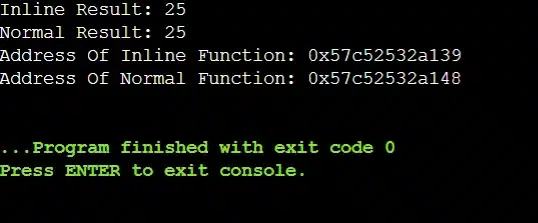
Result: Inline functions do not produce different outputs. Any visible difference in output would be misleading, because inlining only affects compilation, not program logic.
When Should Students Avoid C Inline Functions?
Our expertise says that when students start understanding the Inline Function, they start using it for every case. But here is the problem that arises. The C Inline Function should be avoided in the following scenarios.
- Students should avoid inline functions for large or complex logic because copying large code blocks increases program size.
- Inline functions should not be used for recursive functions, as neither of them works well together.
- Functions that are rarely called should remain normal functions rather than being converted to Inline functions.
- Inline functions should be avoided when debugging is a priority, since it will make it harder to trace during execution.
- Beginners should avoid inline functions in multi-file projects unless they clearly understand linkage and translation units.
Conclusion:
In the end, we can say knowing “Inline Functions In C” is very crucial for your future career.
If the concept of the Inline Function is clear to you, then you can easily do the code optimization. This will provide you with an extra benefit before starting the Algorithm concept. You have to practice the Inline Functions as much as possible to understand its working process.
Without clearing the basic C language, you should not move for this concept. Curious about learning C programming then here is the guide to start learning C in 5 easy steps.
Takeaways:
The Inline Function can be marked using the Keyword Inline in any certain Function.
If the Inline Function is providing errors, we have to use the Specifiers in the program.
We can’t use the Extern Keyword and Inline Keywords at the same time.
The combined use of the Extern & Inline Keywords will make the function a normal one.
Frequently Asked Questions
Does the Inline Function always make code faster?
No. Inline functions do not always improve performance. If the function is large, the copied code size will increase, which can reduce performance due to cache misses.
Why do inline functions sometimes cause “undefined reference” linker errors?
If an inline function is not marked as static or not defined correctly across translation units, the compiler may not generate a callable symbol, leading to undefined references during linking.
Is it better to use inline functions instead of macros in C?
In most cases, inline functions are safer than macros because they follow type checking, respect scope rules, and evaluate arguments only once. Macros can still be useful for very simple substitutions.


