

Dynamic Memory Allocation refers to the process of allocating memory during the execution of a program rather than at compile time. In C, arrays normally require a fixed size to be declared in advance.
However, in many real-world scenarios, a programmer may not know beforehand how much memory will be required. This limitation of fixed-size arrays makes memory management challenging.
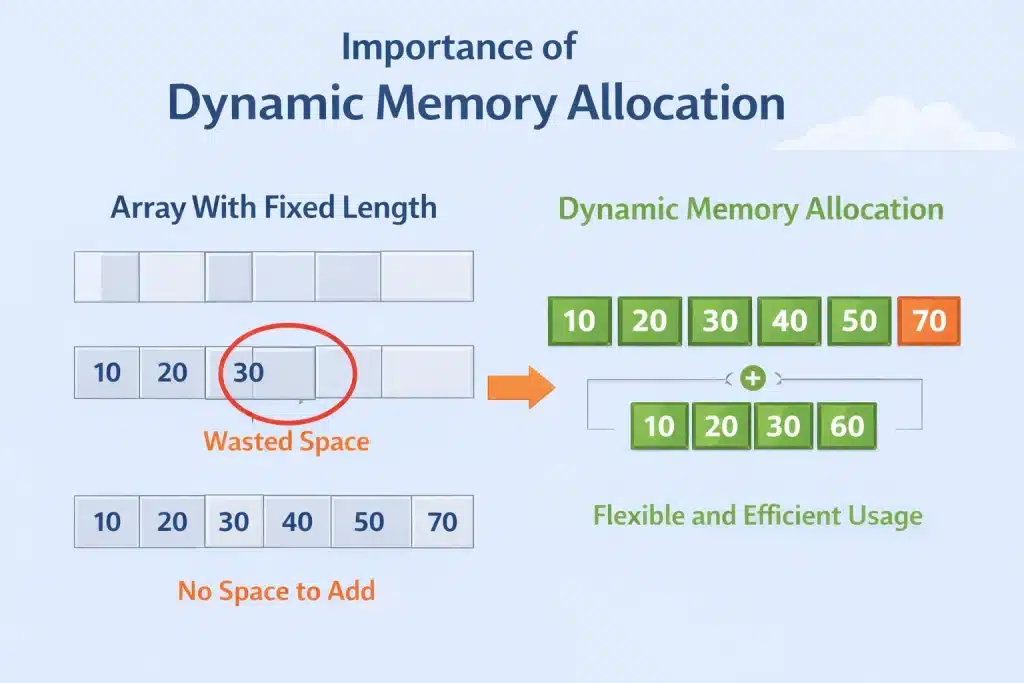
If a programmer declares a large array to avoid a shortage, a significant portion of memory may remain unused, leading to wastage of system resources. On the other hand, if a smaller array is declared and the data exceeds its capacity, then it can cause overflow issues.
Dynamic memory allocation solves this problem by allowing memory from the heap at runtime, exactly when it is needed. The memory can also be resized or released when it is no longer required.
Why Students Find Dynamic Memory Allocation In C Difficult?
From my experience in mentoring, I have seen many students struggle with Dynamic Memory Allocation because it introduces manual memory management, which is very different from other modern languages.
In C, you are fully responsible for allocating and freeing memory correctly. One small mistake can lead to crashes, memory leaks, or undefined behaviour. This is the main reason behind all the confusion.
Here, I am listing down some more reasons that I believe confuse students.
1) Stack Vs Heap Is Not Visually Clear:
The major reason is that students don’t find the difference between the stack and the heap. They hear about “stack memory” and “heap memory,” but the logic has never been clear to them. Since both store variables, it feels like unnecessary theory.
If ‘free(arr)’ is removed, the program may still run fine. But the memory will still be occupied after the end of the program. Because the mistake isn’t instantly visible, students underestimate its importance.
The Memory Layout In C Language: The Stack And Heap
Before we move deeper into Dynamic Memory Allocation in C, it is important to understand how memory is organized in a C program. The memory layout mainly consists of two important areas.
They are the Stack and the Heap. Having a clear idea about these two sections will make the concept of memory management much easier to understand.
- Stack: Stack memory is used to store local variables and manage function calls. Whenever a function is called, its variables are pushed onto the stack. Once the function finishes execution, that memory is automatically removed.
- Heap: Heap memory is used for Dynamic Memory Allocation. Unlike the stack, memory in the heap is not managed automatically. It must be allocated and freed manually by the programmer using functions like malloc() and free().
In simple terms, the Stack is used for Static Memory Allocation that happens automatically, while the Heap is used for Dynamic Memory Allocation that requires manual control.
Criteria | Static Memory Allocation | Dynamic Memory Allocation |
Allocation Time | Compile Time | Runtime |
Memory Size | Fixed | Flexible |
Location | Stack | Heap |
Management | Automatic | Manual |
Example | int arr[10]; | int *arr = malloc() |
What Are The Methods To Do Dynamic Memory Allocation?
In the C programming language, we can facilitate the process of dynamic memory allocation using 4 library functions. These 4 library functions are:
- Malloc()
- Calloc()
- realloc()
- free()
Let’s also get to know how we can use the above 4 functions with the help of example codes.
Dynamic memory allocation in C relies heavily on pointers, a variable that stores memory addresses. If you want to strengthen your understanding of pointers and how they work under the hood, this guide on Types of Pointers in C++ offers clear explanations and examples.
How To Do Dynamic Memory Allocation In C Using Malloc()?
The malloc() or ‘memory allocation’ function in C allocates a single memory block of a set size. This block initially contains some garbage value. By default, it returns a pointer of the type void.

When To Use Malloc():
- Use malloc() when you need to allocate a block of memory at runtime, and you already know the total number of bytes required.
- Use it when you want faster allocation, and you don’t need the memory to be initialized to zero.
- Use malloc() when creating dynamic arrays, structures, or linked list nodes where you will manually assign values after allocation.
General Syntax: p = (int)*malloc(n*sizeof(int));
Steps Of The Program:
- First, take one integer pointer that will be used to get the initial address of the malloc() block.
- By taking the input number from the users, make a specific number of blocks inside the memory.
- Make a conditional statement to catch the faulty insertion of the users.
- Implement a for loop to take data from the users & insert it into the array.
- Using another for loop, check all the elements & print them.
Output:

How To Do Dynamic Memory Allocation In C Using Calloc()?
Another way to facilitate dynamic memory allocation in C is by using Calloc() or the ‘contiguous allocation’ function.
The Calloc() function allocates multiple blocks of memory for storing variables and returns a pointer of type void, which can be cast to the type the user wants.
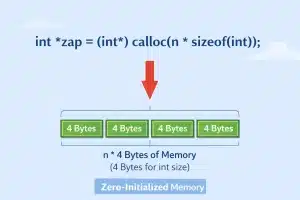
The Calloc() function also initializes the blocks to zero. Hence, unlike malloc(), no garbage value is present in the memory blocks.
When To Use Calloc():
- Calloc() should be used when you need to allocate memory for multiple elements and want all values automatically initialized to zero.
- Use it when working with arrays of integers, floats, or structures where default zero values prevent garbage data issues.
- Use calloc() when safety and clean initialization are more important than minor performance differences.
General Syntax: p = (caste type)*calloc(n, size);
Steps Of The Program:
- In this case, an integer pointer is declared that is going to accept the initial address of the calloc() block.
- Now, implement the calloc() statement using the above syntax for a specific number of elements.
- Using the for loops, the data will be inserted into the array. And another for loop will be implemented to print all of them.
Output:

Performance Comparison Table Between Malloc() And Calloc():
Most students get confused between the malloc() and calloc() functions. Sometimes, they use malloc() in place of calloc() and vice versa. To avoid such a scenario, here is the comparison table between them.
Criteria | Malloc() | Calloc() |
Allocation | Faster | Slower |
Initialization | Uninitialized | Zeroed |
Memory State | Garbage | Clean |
Parameter | Single | Double |
Performance | Better | Lower |
How To Do Dynamic Memory Allocation In C Using Realloc()?
We use the realloc() function in C to ‘re-allocate’ or re-size the memory block that was previously allocated by using the malloc() or calloc() functions. If the already existing memory block is insufficient, then that can be reshaped with the help of the realloc() function.

When To Use Realloc():
- Use realloc() when you need to increase or decrease the size of previously allocated memory.
- It should be used when you start with a small dynamic array and later realize you need more space based on user input.
- Use realloc() carefully when resizing buffers, ensuring you store the returned pointer properly to avoid memory loss.
General Syntax: p = realloc(p, Newsize);
Steps Of The Program:
- First, in the program, the memory allocation will be done with the help of the malloc() function.
- Now, in the same manner, the data will be taken & it will be printed inside the program.
- Suppose there is a need to insert two elements in the program. So, the realloc() function is implemented with the same malloc() size.
- But the new size that should be added is summed there. It will increase the space.
- Now, the number of elements will be added & printed in the program.
Output:

What Is The Purpose Of Free() In Dynamic Memory?
The free() function does the opposite of malloc() and calloc(). Unlike the malloc() or calloc() function, free() actually ‘de-allocates’ the previously allocated memory. This means that the function helps in freeing and reducing memory. This memory can be used later in the program.

When you allocate memory manually, forgetting to release it later can cause memory leaks, small mistakes that pile up and crash your program. To learn how leaks happen and how to avoid them, check out How Memory Leaks Happen and How to Avoid Them.
When To Use Free():
- Use free() whenever dynamically allocated memory is no longer needed.
- Use it to prevent memory leaks, especially inside loops or long-running programs.
- Always use free() before a pointer goes out of scope if that memory was allocated using malloc(), calloc(), or realloc().
General Syntax: free(p); Here, ‘p’ is the variable that was previously allocated to the memory.
Steps Of The Program:
- Suppose one dynamic memory is allocated using the calloc() method. The implementation process is the same as we have done above.
- Now, the data is also printed in the program using a for loop & some statements.
- Now, using the above syntax, we are going to remove the complete pointer that holds the initial address of the block. It will remove the block itself from the computer memory.
- At last, one statement is implemented to show that the program executed completely.
Output:

When Not To Use Dynamic Memory Allocation In C Programming?
Over the years, I have seen many students assume that Dynamic Memory Allocation is always the better option. That is not true. Just because you can use heap memory in C does not mean you should always use it.
As a developer, your job is to choose the simplest and safest solution for the problem. Here are situations where you should avoid Dynamic Memory Allocation.
- When the data size is fixed and known in advance, never use the dynamic memory allocation technique.
- It should be avoided when working with small programs or beginner-level questions, where static arrays will be simple to use.
- Avoid using dynamic memory allocation when performance is extremely critical, because stack allocation is faster than heap allocation.
- Don’t go for it when you are not confident about managing memory properly, since forgetting to call free() can cause memory leaks.
- When writing embedded systems or low-level applications with limited memory, you should avoid it because dynamic allocation may not be safe or allowed.
Mentor Advice: Use Dynamic Memory Allocation only when flexibility is truly required. Otherwise, keep it simple and stick to static memory.
What Are Some Real-World Usage Of Dynamic Memory Allocation?
While mentoring students in C programming, I have noticed that students often assume that dynamic memory allocation is only taught for educational purposes.
To remove such assumptions from their mind, I usually list down the real-world usage of it. Here is the list that I usually give to my students.
- It is used to manage processes and system resources dynamically in Operating Systems.
- In Database Systems, it helps to store and retrieve large, variable-sized data efficiently.
- In File Handling Programs, allocation of memory based on file size at runtime is done by it.
- To build syntax trees and symbol tables dynamically in different compilers, this method is used.
- If you want to work on linked lists, stacks, queues, and trees, dynamic memory allocation will be needed.
Common Mistakes Students Make In Dynamic Memory Allocation:
While dealing with Dynamic Memory Allocation in C programming, there are some serious mistakes that students often commit in their exams. Let us check some such common mistakes.
- Sometimes, we dynamically allocate new memory, but forget to free it. This creates a memory shortage, and hence, we will experience the Memory Leaks issue.
- Sometimes, a pointer that has the address of the memory has been freed, but we don’t remove the pointer and still try to use it. This causes the Dangling Pointer Error.
- Dynamic Memory Allocation sometimes might not create the memory. But we assume memory has been created and start work on it, which causes such issues.
- Sometimes, when we try to free a dynamically created memory that was already freed earlier, this results in the Double Free Error issue in our code.
- Sometimes, we mix up the Stack and Heap memories. We treat dynamically created memories like local variables, which creates all the problems.
