Memory Leaks In C++: Causes, Examples, And Fixes – CodingZap

Memory Leaks in C++: And How To Prevent It?

“Memory Leaks in C++” is one of the most common challenges students face when working with dynamic memory management. As a mentor, I have seen many programmers struggle with this issue.

Before we explore how to detect and fix memory leaks, it is important to understand what they are, why they happen, and how proper memory management practices can prevent them.

Let us build that foundation step by step so you can write safer, more efficient C++ programs.

TL; DR: Memory Leaks In C++

Aspect

Summary

Overview

A memory leak occurs when dynamically allocated memory is not released after use, causing unused memory blocks to remain occupied during program execution.

Common Causes

Memory leaks usually happen due to missing delete statements, active or dangling pointers, overwriting pointer addresses, and improper handling of dynamic memory.

Prevention Methods

Using RAII principles, smart pointers, STL containers, and avoiding unnecessary dynamic allocation can significantly reduce memory leak risks.

Detection And Impact

Memory leaks degrade performance over time and may crash applications; tools like Valgrind and AddressSanitizer help detect such issues during testing.

What Are The Memory Leaks In C++?

In C++, a memory leak usually occurs when a programmer allocates memory dynamically using the ‘NEW’ keyword, but fails to release it properly. Since C++ gives you manual control over memory management, it also gives you the responsibility to free that memory when it is no longer needed.
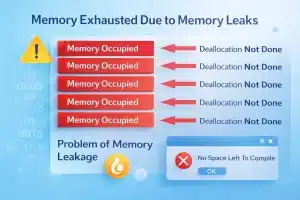
An image showing the problem of memory leak where memory gets exhausted due to non-removal of allocated memories

If dynamically allocated memory is not deallocated, it remains reserved until the program terminates. Over time, in long-running applications such as servers or large systems, these unreleased memory blocks accumulate.

This reduces the available memory and can eventually slow down the system or even cause the program to crash. If you want to understand the root of this problem, learn how Dynamic Memory Allocation in C works and how memory is managed using functions like malloc() and free().


What Are The Types Of Possible Memory Leaks In C++ Language?

Memory leaks in C++ are broad in scope, but they can generally be grouped into two main categories. Both categories can significantly impact performance, stability, and scalability in real-world applications.

As your mentor, I will advise you to understand them clearly to identify and prevent memory-related issues in your code.

1) Explicit Memory Leak:

An explicit memory leak is a critical issue for developers aiming to write fully optimized and efficient code. This type of memory leak occurs due to mistakes made during the coding process.

It arises when working with pointers, dynamic memory allocation, or similar low-level memory management techniques. If a programmer allocates memory but fails to release it properly, the unused memory remains occupied.

				
					#include <iostream>
using namespace std;
int main() 
{
    int* ptr = new int(5); //Creation Of The Pointer
    cout << *ptr << endl;
    // The Pointer Has Not Deleted
    return 0;
}


Implications: The unreleased memory gets piled up over time, system performance may degrade, and the system may crash to execute properly.

2) Implicit Memory Leak:

Unlike Explicit Memory Leaks, implicit memory leaks are generally more complex and harder to detect. These issues arise less frequently, as they are not always the direct result of a programmer forgetting to free allocated memory.

Implicit memory leaks can be triggered by hidden factors such as circular references that prevent proper deallocation, framework-level faults, or unintended object retention.

				
					#include <iostream>
#include <memory>
using namespace std;
class B;
class A { // Creating The Shared Pointer
public:
    shared_ptr<B> bPtr;
};
class B { // Creating The Shared Pointer
public:
    shared_ptr<A> aPtr;
};
int main() {
    shared_ptr<A> a = make_shared<A>(); // Creating the Shared Pointer For Class A
    shared_ptr<B> b = make_shared<B>(); // Creating the Shared Pointer For Class B
    // Reference Count Will Never Reach Zero
    a->bPtr = b;
    b->aPtr = a;
    return 0;
}


Implications: It is not easily identified, and the overall code logic should be scrutinized to find out the fault that leads to high time consumption, as well as the programmer’s efforts.


Why Do Memory Leaks Happen?

I have seen many times that students understand the memory leaks definition, but they get stuck when I ask them about some of the reasons behind it.

What I have analyzed is that students memorize the definition of memory leaks, but they struggle to extract the causes of memory leaks from the definition. To help you there, I have listed some common reasons for it.

1) Keeping Allocated Memory:

This issue is most commonly seen in dynamic memory allocation. Memory that is allocated during program execution is not released after it is no longer needed. In such cases, the programmer forgets to free the allocated memory at the end of its usage, resulting in a memory leak.

				
					#include <iostream>
using namespace std;
int main() 
{
    int* ptr = new int(5); //Creation Of The Pointer
    cout << *ptr << endl;
    // The Pointer Has Not Deleted
    return 0;
}


Here, the program dynamically allocates memory for an integer and initializes it with the value 5 using a pointer. It prints the value stored at the allocated memory location to the console.

The program ends without deleting the allocated memory, resulting in a memory leak.

2) Active Pointer:

A pointer itself does not cause a memory leak. The real problem happens when the memory allocated on the heap is not released properly. Even if a pointer variable disappears when a function ends, the dynamically allocated memory will remain reserved if ‘delete’ is not used.

Many beginners lose track of memory references while working with pointers, so it is worth reviewing the Types of Pointers in C++ and how each one behaves during program execution.

				
					#include <iostream>
using namespace std;
int main() 
{
    int* ptr = new int(5); //Creation Of The Pointer
    cout << *ptr << endl;
    delete ptr; // The Pointer Has Been Deleted
    // The Pointer Has Not Been Set To Null, Hence, It Is Active
    return 0;
}


An integer with the value 5 is created on the heap, and its address is stored in a pointer. The program accesses the heap memory through the pointer and displays the stored value.

3) Losing Intermediate Address:

This issue occurs when a programmer reuses a pointer for multiple memory allocations. If the pointer is reassigned without first freeing the previously allocated memory, the original address is lost.

As a result, the program can no longer access or release that memory, leading to memory leaks and related issues.

				
					#include <iostream>
using namespace std;
int main() {
    int* ptr = new int(5);   // First Allocation Of Pointer
    ptr = new int(10);       // Old Address has Lost With The New One
    cout << *ptr << endl;
    delete ptr;              // Only The Last Allocation Is Freed
    return 0;
}


The pointer is first assigned heap memory storing the value 5. It is then reassigned to a new heap allocation containing 10, causing the original memory address to be lost.

Only the second allocation is released, while the first remains unfreed, resulting in a memory leak.


What Is The Way To Detect Memory Leaks In C++?

As I often tell my mentees, detecting memory leaks in C++ is not about finding a magical built-in command; it is about developing disciplined coding habits.

Let us walk through a simple example to clearly understand how such leaks occur and how to spot them early in your programs.

				
					#include < iostream> 
using namespace std;
void func() // User Defined Function To Identify Memory leak
{
	float* zap = new float(3.4); // Allocating Memory To The Float Pointer
	cout << "There Are Memory Leak"; // Printing Any Statement
}
int main()
{ 
	func(); // Calling The User Defined Function
	return 0; 
}


Steps Of The Program:

  • In this example, memory is allocated inside the function using the new keyword. However, the program never calls delete to release that memory.

  • When the function finishes execution, the pointer variable goes out of scope, but the allocated memory on the heap remains reserved. This results in a memory leak.

Output:

Output image of a program which identifies any Memory Leaks in C++ codes and showing confirmation message on the screen


What Are Some Tips To Avoid Memory Leaks In C++?

I have seen students get overwhelmed when they learn about the Memory Leaks. They often ask me in panic whether there is any way to avoid memory leaks while developing code in the C++ language.

I reply to them with the following points that give them confidence. I hope these will also give you confidence.

  • You need to use the smart pointer whenever there is a provision for it. Programmers need to reduce the work for memory management on their own. It will help a lot.
  • Students need to use the std::string class more often whenever there is a need to handle character elements. Programmers need to reduce the use of the char* pointer operations.
  • The std::string class can handle all the memory management on its own.
  • Users can use the raw or new pointer whenever they are referring to any other old library of the C++ programming language.
  • Programmers need to be very careful while doing such operations. You need to pay full attention to the code that you are writing with the help of the dynamic memory allocation process.

In real-world projects such as long-running servers or large desktop applications, memory leaks do not crash the program immediately. Instead, memory usage keeps increasing gradually until the system slows down or becomes unstable.

That is why professional developers always monitor memory behavior during testing rather than relying only on successful compilation.


How To Deallocate Or Remove C++ Memory Leaks?

When I mentor students, I always emphasize that fixing memory leaks starts with understanding ownership of dynamically allocated memory. In C++, the primary tool for releasing heap memory is the ‘delete’ keyword, which must correspond to every new allocation.

Let us go through a simple example to see how proper deallocation prevents memory leaks and keeps your program efficient and safe.

General Syntax: delete(pointer-name);

				
					#include < iostream>
using namespace std;
void func() // User Defined Function To Identify Memory leak
{
    float* zap = new float(3.4); // Allocating Memory To The Float Pointer
    cout << "There Are Memory Leak"<<endl; // Printing Any Statement
    delete(zap); // Delete Function To Remove Memory
    cout << "Memory Leak Removed"; // Printing Any Statement
} // Function Closed With Deallocation

int main() // Main Function
{
    func(); // Calling The User Defined Function
    return 0;
}


Steps Of The Program:

  • A user-defined function allocates memory dynamically for a floating-point value using the new keyword.

  • The program prints a message to indicate that the function has executed.

  • The function ends by releasing the allocated memory using delete.

  • Since the memory was deallocated, the allocated block will not remain in the heap.

Output:

Output screenshot showing the deallocation or removal method of memory leaks in any C++ program using the delete keyword


What Is The Role Of Smart Pointers In Memory Leak Prevention?

Smart pointers exist to manage ownership automatically and prevent manual memory mistakes. In modern C++, I encourage you to use ‘unique_ptr’ instead of raw pointers.

The Smart pointers are part of the C++ Standard Library and follow the RAII Principles. Let us check the following code snippet, where a Smart Pointer has been initialized.

				
					#include <iostream>
#include <memory> // Package To Deal With Smart Pointers
using namespace std;
int main() 
{
    unique_ptr<int> ptr = make_unique<int>(10); // Unique PTR Has Created To Be Used As Smart Pointers
    cout << *ptr << endl; // Printing The Pointer
    return 0; // No DELETE Keyword has used
}


Steps Of The Program:

  • unique_ptr has been used to mark the Smart Pointers, which will manage memory automatically.
  • We have not used any DELETE Statement to remove the pointer from the memory space.
  • The pointer will get automatically removed when they will go out of the scope.
  • Smart pointers reduce the memory leaks often created by forgotten Deallocation.

Output:
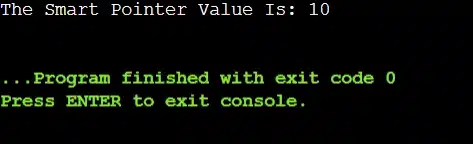
Output image showing the use of smart pointers where no delete keyword is needed to remove the allocated memory

Like the unique_ptr, we can use the shared_ptr and weak_ptr for different purposes. The Smart Pointers are the best over the raw pointers in a C++ program.


What Are Some Tools To Detect Memory Leaks?

There are certain tools present to check the Memory Allocation Problem in computer science. And as you grow as a developer, you should make memory analysis tools part of your workflow.

Using these tools regularly will train you to write cleaner and safer C++ code. These are the tools used for accessing a large code where finding a memory leak manually is nearly impossible.

1) Valgrind:

Valgrind is one of the most widely used memory debugging tools for C and C++ programs. It performs a deep analysis of how a program uses memory and helps detect issues such as memory leaks, invalid memory access, and improper deallocation.

Developers typically run their compiled programs through Valgrind using commands like valgrind –leak-check=full ./program

2) AddressSanitizer

AddressSanitizer (ASan) is a runtime memory error detector supported by modern compilers such as GCC and Clang. It helps identify memory leaks, buffer overflows, and use-after-free errors during program execution.

Developers can enable AddressSanitizer by compiling their program with the flags: -fsanitize=address -g

Once enabled, the tool automatically checks memory operations while the program runs and reports any detected issues.

3) Purify:

Purify is a commercial memory debugging tool commonly used in large-scale enterprise applications. It monitors memory behavior during program execution and helps developers detect memory leaks, invalid memory usage, and other memory-related errors.

Such tools are particularly useful in large software systems where manually tracing memory allocations is difficult.

Conclusion:

In mastering “Memory Leaks in C++”, remember that this is not just a technical topic; it is a responsibility that comes with writing efficient and reliable code.

As you continue developing your skills, always focus on understanding dynamic memory allocation and pointer behavior, because these form the foundation of proper memory management.

Make it a habit to track every allocation and ensure it is properly deallocated. When you build this discipline early, you will prevent serious performance issues in larger projects.


Key Takeaways:

  • Not deallocating Dynamic Memory leads to the Memory Leak problem in C++.
  • We must be careful while working with dynamic memory allocation and pointers.
  • There is no certain code present to check the Memory Leak issue.
  • The Memory Leak issue will not come as an error while compiling any code.
  • Always deallocate memory in code after using it for any specific reason.
  • There are different tools present, as per the OS, to find the Memory Leak in code.


Frequently Asked Questions:

1) Can I get any warning while compiling code with a memory leak?

No. A memory leak does not usually produce a compilation error or warning. The program may compile and run successfully even if a leak exists. However, the problem becomes serious in long-running applications because the unused memory keeps accumulating.

2) How can I find a Memory Leak in Code?

If you are working on any large code with a thousand lines, then finding out the Memory Leak is difficult. In such cases, use the Memory Leak Tools present on the internet. However, if your code is too small, scan the code with your eyes to get the Memory Leak issue.

3) If a piece of code has a memory leak, is it considered unacceptable?
A memory leak usually does not stop a program from compiling or running correctly. However, good programming practice is to release memory properly to avoid resource issues in larger applications. So while it may run fine, it is always better to fix memory leaks whenever possible.