If you have just started working on the Java Recursions, then you might have faced one of the most infamous runtime issues. The issue is known as the “StackOverflowError in Java”.
If your developed Java program enters a never-ending recursive cycle, it will throw the Java StackOverflowError. However, fixing a StackOverflow Error in Java is not particularly difficult.
In this article, we will first clarify the StackOverflow Java Error. Later, we will provide some debugging methods to remove such errors from your code. So, let us start our discussion.
TL;DR: StackOverflowError In Java Recursion
Aspect | Summary |
What is StackOverflow? | This error happens when recursive calls keep adding stack frames without termination, exhausting the JVM call stack memory. |
Common Causes | Missing base case, Wrong base case logic, Incorrect indirect or mutual recursion |
Fixing Methods |
|
Real Example | A real Java Problem Statement has been taken with the following:
|
What Is The StackOverflow Error In Java Recursion?
When you are working on any Java Recursion problem, the JVM allocates a Memory Block, which is known as the Call Stack. For every method called, a Stack Frame is created and inserted into the Call Stack.
The Stack Frame contains the details of all Local variables, Return address, and Method parameters. When the recursion call is finished, all the Stack Frames will be popped out, and the memory will become free.
If the Recursion goes on in an infinite loop, then more and more Stack Frames will get created and inserted in the Call Stack. When there is no space left in the Call Stack, the StackOverflow Error will happen.
public class Main {
public static void main(String[] args) {
factorial(5); // Calling The Recursive Function
}
public static int factorial(int n) {
// No Base Case Present
return n * factorial(n - 1);
}
}
In the above code, the recursion function has no base case, so it will not end and run infinitely. When you execute the code, you will get the output shown below, which indicates a StackOverflow Error.
What Causes The StackOverflow Error While Performing Recursion In Java?
We hope the background of the Java StackOverflow Error has become clear to you from the above discussion. Now, there can be multiple reasons why you are getting the StackOverflow Error in Java Recursions.
In this section, we have to look at them before moving on to the debugging methods. So, let us check them.
1. Missing Recursion Base Case:
One of the very important reasons for which you are getting the StackOverflow Issue is the absence of a Recursion Base Case. Every recursive function should have a Base Case to terminate the recursion call.
public static int factorial(int n) // Recursion Function
{
// No Base Case Present
return n * factorial(n - 1);
}
In the above code snippet, the Base Case is missing. Hence, the code will not stop and goes on until the StackOverflow Error happens. So, you have to always put the Base Case in recursion; this is the only fix.
2. Implementing Wrong Base Case:
Sometimes, students don’t forget to put the Base Case. But, they put the wrong logic in the Base Case. In that case, the Recursion Function will never meet the Base Case and hence move in an infinite loop.
public int sum(int n) // Recursion Function
{
if (n == 0) // Base Case
return sum(n - 1); // Wrong Logic
return n + sum(n - 1);
}
In the above code snippet, there is a Base Case. However, the Base Case is not returning any value. Rather, it will call the Recursive Function again. So, the cycle will go on and on without any end.
3. Incorrect Indirect Recursion:
If you are doing Mutual or Indirect Recursion, then using incorrect logic there can create an endless recursive loop in the code. This can also happen if there are no base cases present in the recursion function.
public void methodA() // Method A Calling Method B
{
methodB();
}
public void methodB() // Method B Calling Method A
{
methodA();
}
In the above code snippet, Method A is calling Method B, and Method B is calling Method A. Both the Indirect and Mutual Recursions don’t have any endpoint to stop. Hence, the StackOverflow will happen.
Still have no clue about the topic and you want to get a deeper understanding with an expert Java tutor, then you can contact us for the same.
What Are The Methods To Fix StackOverflow Error In Java Recursion?
So, you are now aware of the potential reasons for which you might get the StackOverflow issue. But, god forbid, if any StackOverflow Error happens in your code, then what will be your strategy?
In such cases, you have to use any one of the following methods. Let us check some effective fixing methods.
Method 1: Use Print Statements
The first method is to use the Print Statements in the Recursion Function. Whenever you are developing any recursive function, you have to add a print statement before the base case to check the program execution.
public class Main {
public static int factorial(int n) {
// Added Print Statement
System.out.println("Factorial Value(" + n + ")");
if (n == 0) // Base Case
return 1;
return n * factorial(n - 1);
}
public static void main(String[] args) {
factorial(5); // Calling The Recursive Function
}
}
Explanation Of The Code:
- In the Factorial() Recursive Function, a Print Statement has been added before the Base Case.
- This will keep track of the recursion and if an error happens, we will get it known by checking the output.
- Then, a regular Factorial() function has been developed that will give the factorial for Value 5.
Output:
Method 2: Fix The Base Case By Stack Trace
If there is any StackOverflow error in your code, you will get to know about it by checking the Stack Trace or the complete error message. In that Stack Trace, the line of error will be mentioned; you have to visit that line.
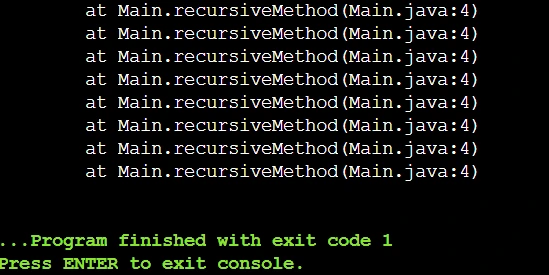
In this error, the Error Line is at Line No: 4. In most cases, the problem arises for a Missing or Incorrect Base Case. So, if the error line is somehow near the Base Case, then you have to fix it first.
Method 3: Increase The Stack Size
Another method that you can use to deal with the StackOverflow error is by increasing the Stack Size. However, this is not an effective method and can still cause a Java StackOverflow error if you are not cautious.
But, still, this method removes the chances of encountering StackOverflow issues for common Java programs. To increase the Stack Trace, you have to open the JVM in a terminal and execute the following command.
java -Xss2m ProgramName
The above command can be divided into smaller chunks like the following:
- The JAVA term will start the JVM.
- The –Xss Parameter will set the Stack Size per thread to 2 megabytes, which is actually 1 megabyte by default.
- Then, you have to mention the program name that you want to execute.
Real Example: Debugging StackOverflow Error In Java Recursion
Now, if you still have any doubt about the debugging of StackOverflow error, then this section will be enough to remove your every remaining doubt, as we will use a Real Problem Statement here. So, let us start.
Problem Statement: Write a Java program to calculate the factorial using recursion
Wrong Code:
Here is a faulty version of the code developed by a beginner that causes a StackOverflowError:
public class Main {
public static int factorial(int n) {
// Missing Base Case
return n * factorial(n - 1);
}
public static void main(String[] args) {
factorial(5); // Calling The Recursive Function
}
}
Here, the code gives a StackOverflowError for the following reasons. Let us check them out:
- There is no base case present in the recursive function.
- This will create an infinite recursive loop, which will cause the StackOverflow error.
Correct Code:
Now, we will show the correct version of the code, which fixes the StackOverflowError:
public class Main {
public static int factorial(int n) {
// Added Print Statement
System.out.println("The Value: " + n );
if (n == 0) // Base Case
return 1;
return n * factorial(n - 1);
}
public static void main(String[] args) {
factorial(5); // Calling The Recursive Function
}
}
Now, let us check out the handling methods that are used in this code to make it perfect. Here is the list:
- Method 1 has been used, where a Print Statement is used before the base case.
- Method 2 has been used, where using the Stack Trace, the error line has been found, and the base case has been written.
- The fixing method 3 can also be used to increase the Stack Size using the –Xss Parameter during the code execution.
Key Takeaways:
- When you are dealing with Java recursions, StackOverflow issues will become more common.
- If you are calling an infinite recursive function, then StackOverflow happens due to a lack of memory.
- Missing or Wrong Base Cases, Incorrect and Indirect recurrences are one of the common causes.
- Using Print Statement, Fixing the Base Case, and Increasing the Stack Size are some common fixes.
FAQs (Frequently Asked Question by Students)
When any recursion problem goes too deep in recursion without a proper stopping point, then a StackOverflowError occurs in Java.lang Package can be seen. This happens due to an out-of-memory error in the JVM.
To prevent the StackOverflow Error in Java, you have to write a clear and reachable base case in your recursive function. You have to make sure that the recursion calls move towards the base case and eventually stop.
No. Increasing the JVM Stack Size can provide a temporary solution, but it doesn’t fix the underlying problem. If you want to fix the StackOverflow error, then you have to use a proper base case to end infinite recursion.


