

A text-based adventure game in Java uses Scanner for player input, methods for each game location, if-else or switch statements for branching choices, and a Random object for unpredictable outcomes. Below, you will find a complete working game with 8 modules explained step by step, plus an OOP version using Room and Player classes for more advanced projects.
A text-based adventure game (also called interactive fiction) is one of the best beginner Java projects you can build. The player reads a situation on screen, picks a choice by typing a number, and the story branches based on that decision. There are no graphics — just your code, your story, and the player’s imagination.
I built the game below during my second year of college, and I have improved it several times since then. The version on this page has a health system, a score tracker, random outcomes for fights and treasure chests, and two main paths (a Dark Cave and an Enchanted Forest) that branch into multiple endings.
By the end of this tutorial, you will have two working versions:
1. **A procedural version** (beginner-friendly) — uses static methods and a simple structure. Great if you are just learning Java.
2. **An OOP version** (intermediate) — uses proper Room, Player, and GameEngine classes. This is what your professor expects if you are submitting this as a semester project.
Both versions compile and run in any terminal with ‘javac’ and ‘java’. No IDE required, though VS Code with the Java Extension Pack works great.
**What you need to know before starting:**
Basic Java syntax, if-else statements, methods, and Scanner for user input. If you are comfortable with Java data types and writing simple methods, you are ready.
The Game Story: What Are We Building?
Before moving to the detailed implementation process of the Adventure Game, it is necessary to understand the background story on which the entire game is developed. It will help to think about the situation & modify the concept if needed!
The story is that, as a Player Class, you find yourself in a mysterious place, and there are two ways present. Either to enter into a Dark Cave or to enter into an Enchanted Forest. In the Dark Cave, there is a chest present inside that might be a treasure or a dragon that can eat you alive!
In the Enchanted Forest, there is a dangerous creature present. Either you have to fight it to get more scores to complete the game, or move ahead to the next steps. You might die by fighting or can gain scores by defeating the creature.
This is the base idea of the Adventure Game. You can find many more surprises as you move ahead in the process.
Here is a simple flowchart showing every path through the game: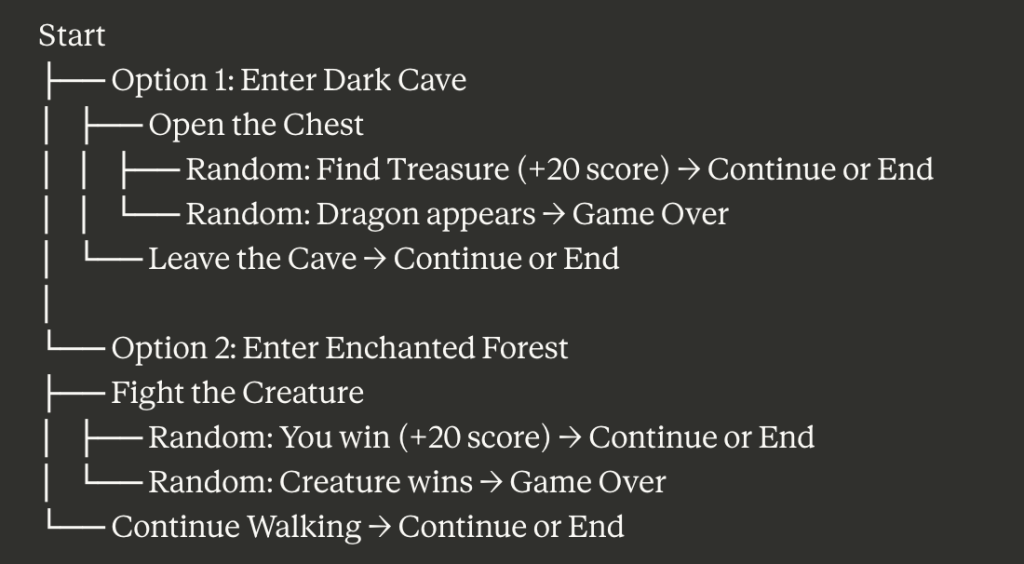
Each “Continue or End” point lets the player restart the adventure loop or end the game and see their final score. The random outcomes use Java’s `Random` class to generate 0 or 1 — so every playthrough is different.
Game Architecture: The 8 Methods We Need
It is time to discuss the modules or functions that we have to develop in the program to implement the Text Adventure Game.

Here are the 8 methods that make up the game. Each one handles a different part of the gameplay:
1. **main()** — Entry point. Sets up health and score, then starts the game.
2. **startGame()** — Presents the two paths (Cave or Forest) and routes the player.
3. **exploreCave()** — Handles the treasure chest scenario with random outcomes.
4. **enterForest()** — Handles the creature fight scenario with random outcomes.
5. **continueGame()** — Asks the player if they want to keep playing or end.
6. **exploreRandom()** — Generates a random 0 or 1 to decide outcomes
. 7. **pause()** — Waits for the player to press a key before continuing.
8. **clear()** — Clears the console screen for a cleaner experience. Let me walk through each one.
Details Of Each Function Module Along With Its Implementation Steps In Java Language:
The total developed code is broken into 8 parts for an easy understanding process. We will make an entire large code by merging all of these modules later. Let us start with the Main Code from where the entire program starts.
Details Of The Main() Function Module:
The Main Function Module is developed with the help of the Static Main Method along with some libraries that we need to import in the program. The goal of this module is to start the entire program by calling the key function.
					import java.util.Scanner; // Calling Scanner Libraries To Take Input
import java.util.Random; // Calling Random Library To Get Random Number

public class Main {
    public static int health = 100; // Variable To Calculate Health or Int Damage
    // You Can Also Define As Public Int GetDamage
    public static int score = 0; // Variable To Calculate Score
    // You Can Also Define As Public Void SetInventory

    public static void main(String[] args) {
        System.out.println("Welcome To The Text Adventure Game!"); // Printing The Heading
        System.out.println(); System.out.println(); // Getting Space
        startGame(); // Calling StartGame()
        clear(); // Calling Clear()
    }
Steps Of The Code Snippet:
At first, the Scanner Class is imported into the program as we have to take user input to enter the game into a Public Room.
Also, we have to take the Random Module that will generate Random data which will be used later.
In the Main Function, the Heading of the Game will be displayed.
Also, two variables will be declared. One will be the Health Variable to take care of any Damage. Another is the Score Variable which will look at Earned Score.
After providing some line spaces in Output, the StartGame() Function will be called which is a key function.
Later, the Clean() Function Module will also be called.
Details Of The StartGame() Function Module:
The StartGame() Function Module is the key function form where the entire process will get started. As per the input from the user, another function will be called. The If-Else Statement will be used here to get the job done.
					public static void startGame() {
        Scanner scanner = new Scanner(System.in); // Making Scanner Ready

        System.out.println("You Find Youself In A Mysterious Place: ");
        System.out.println("1. Explore The Dark Cave");
        System.out.println("2. Walk Through The Enchanted Forest");
        System.out.print("Enter Your Choice: ");

        int choice = scanner.nextInt(); // Taking Input From Users
        System.out.println();

        clear(); // Calling Clear() Function
        if (choice == 1) // If Choice 1 To Explore Cave
        {
            exploreCave(); // It Will Not Be A Private Room Location, Calling ExploreCave()
            // You Can Also Change & Define The Name Of Function As Public Void Setlocation()
        }
        else if (choice == 2) // If Choice 1 To Enter Forest
        {
            enterForest(); // Calling Explore Forest Function
	// You Can Also Change & Define The Name Of Function As Public Room getlocation()
        }
        else
        {
            System.out.println("Invalid Choice. Game Over!");
        }

        clear(); // Calling Clear() Function
        scanner.close();
    }
Steps Of The Code Snippet:
The Function will display two options to the user. Based on that, the user needs to enter one number to move ahead in the process.
The number will be scanned and saved in one variable.
The Variable will be used in the If-Else Statement to check the input.
If the User wants to go for the Cave Choice (1st Choice), the ExploreCave() Function Module will be called.
If the User wants to go for the Forest Choice (2nd Choice), the EnterForest() Function Module will be called.
If any wrong input is provided the game will end at that spot. Then, the Clear() Function Module will be executed.
Details Of The ExploreCave() Function Module:
The ExploreCave() function is all about the activities in the Cave. There will be a treasure that you can either open or leave it. If you open it you might get treasure & score will get increased. Otherwise, the Dragon will come and eat you alive.
Notice that in the fixed version, the dragon attack actually reduces health to 0. In the original code, health stayed at 100 the entire game and was never used — which made it pointless. Now it matters.
					public static void exploreCave() { // Public Void ExploreCave() Function
        System.out.println("You Enter The Dark Cave And Discover A Treasure Chest!");
        System.out.println("1. Open The Chest");
        System.out.println("2. Leave The Cave");
        System.out.print("Enter Your Choice: ");

        Scanner scanner = new Scanner(System.in); // Implementing Scanner Function

        int choice = scanner.nextInt(); // Taking Input
        System.out.println(); System.out.println();

        if (choice == 1) { // If You Want To Open Chest
            int z = exploreRandom(); // Getting Answer Copy Link From Random Function
            if(z == 0) // If Random Number Is Zero
            {
                System.out.println("A Dragon Comes Out & It Eats You Alive");
                System.out.println("Sorry! You Died.");
                System.out.println("You Collected Score: "+ score); // Printing Score As Died
                pause();
            }
            else // For All Other Cases
            {
                System.out.println("You Find Out Tresure!");
                score = score + 20; // Increasing Score As Treasure Opened
                System.out.println("Your Score: "+ score);
                System.out.println("You Are Now Good To Go Ahead");
                pause(); // Calling The Same Room Pause()
                clear(); //Calling The Same Room Clear()
                confir(); // Calling Confir()
            }
        }
        else if (choice == 2) // If You Wnat To Pass The Cave
        {
            System.out.println("You Leave The Cave And Continue Your Adventure.");
            confir();
        }
        else
        {
            System.out.println("Invalid Choice. Game Over!");
        }

        scanner.close();
    }
Steps Of The Code Snippet:
The User has to choose between the two options to open the Cave or to leave it. Users need to enter one data there.
If users want to open the Chest, the If-Else module will start. And the ExploreRandom function will be called.
From that function, one Random Value will arrive & if the value is Zero, then a Dragon comes up and eats the user alive. So, the game ended and it displays the score if you have earned anything.
In all other cases, the chest will open and there will be a treasure present. It will increase your score in the inventory. The Pause(), Clean(). Confir() function modules will call respectively.
Suppose, you have chosen to leave the chest, then Choice 2 will be executed and a statement will be displayed.
If you have entered any wrong input, the Game will be over there.
Details Of The EnterForest() Function Module:
Suppose, in the StartGame() function, you have decided to go for the Forest. Then, the function will be called. In this function, there are two possibilities present. You have faced the creature, you can fight it. Or you can leave the forest for the next round without any score.
When you win the fight, you still take 15 damage. This makes the game more realistic — winning a fight against a dangerous creature should cost you something.
					public static void enterForest() { // Public Void EnterForest() Function
        System.out.println("You Walk Through The Enchanted Forest And Encounter A Dangerous Creature");
        System.out.println("1. Fight With The Creature");
        System.out.println("2. Continue Walking");
        System.out.print("Enter Your Choice: ");

        Scanner scanner = new Scanner(System.in); // Scanner Function Class
        int choice = scanner.nextInt(); // Taking Input From Users

        clear();
        if (choice == 1) // If You Want To Fight
        {
            int z = exploreRandom(); // Calling ExploreRandom() Function
            if(z == 0) // If Random Number Is Zero
            {
                // You Can Also Use Public Boolean IsAlive Function To Check Separately
                System.out.println("The Creature Wins & Ate You Alive");
                System.out.println("Sorry! You Died.");
                System.out.println("You Collected Score: "+ score); // Printing Score As Died
                pause(); // Calling Pause Function
            }
            else
            {
                System.out.println("You Win The Battle");
                score = score + 20; // Increasing Score As Battle Wins
                System.out.println("Your Score: "+ score);
                System.out.println("You Are Now Good To Go Ahead");
                // Calling Necessary Functions
                pause();
                clear();
                confir();
            }
        }
        else if (choice == 2) // For Choosing Not To Fight With Creature
        {
            System.out.println("You Continue Walking Through The Forest");
            confir();
        }
        else
        {
            System.out.println("Invalid Choice. Game Over!");
        }

        scanner.close();
    }
Steps Of The Code Snippet:
Here also, the user needs to choose between two options. Either to fight with the Creature or to leave the forest.
Users provide data and it will be stored in some variable. Now, the data will be accessed in the program.
If the user wants to fight with the Creature, Choice 1 in If-Else will activated. Here, the ExploreRandom() function will be called.
After executing the Random numbers, if the data Zero comes, the Creature will win the fight and you will lose the game.
For all other cases, you will win the fight and get some scores that will add to your main score. The Pause(), Clean(). Confir() function modules will call respectively.
If you choose Choice 2 to leave the forest, the statement will be called and the Confir() module will get executed.
Details Of The Confir() Function Module:
The Confir() Module is not the major module like the earlier one. At any point in time, when you need to end the game on your own, you have to utilize this function. It is a special end button that is created to manually end the game.
					public static void confir() // Implementing New Room For Confirmation
    {
        Scanner scanner = new Scanner(System.in);
        System.out.println("1. Start The Game");
        System.out.println("2. End The Game");
        System.out.print("Enter Your Choice: ");

        int choice = scanner.nextInt(); // Taking The Choice

        if(choice == 1)
            startGame(); // Calling One Room StartGame() Function
        else
        {
            System.out.println();
            System.out.println("Game Over!");
            System.out.println("You Health Score: "+ health); // Printing Health or Any Damage
            System.out.println("You Collected Score: "+ score); // Printing Earned Score
        }
        pause();
        clear();
    }
Steps Of The Code Snippet:
Here, the two options will present that you can see at any point of the interval. It will ask to continue the game or to end it.
If you want to Continue the Game, Choice 1 will activate. And the StartGame() Module will work.
If you want to manually end the game, go for Choice 2. It will provide the message and all the details will be displayed, how much damage you get and how much score you have generated.
Later, the Pause() and Clear() Module will be executed.
Details Of The ExploreRandom() Function Module:
The ExploreRandom() is one of the small functions that takes a few statements to complete. The Function is fully developed to get some random numbers in a specific range. Based on the Random Numbers, the chance to win the fight against the Creature and find the treasure will be measured.
					public static int exploreRandom() { // For Taking Random Number New Room Function Declared
        Random rand = new Random(); // Making Random Object
        int ran = rand.nextInt(2); // Taking Random Number Between 0 and 1
        return ran; // Return Inventory Random Value
    }
Steps Of The Code Snippet:
A new object will be created with the help of the Random function. Note that, the Random Library is already imported in the Main() Function Module.
The next statement will help to get the Random numbers from Zero to One. The Random number will be stored in some variable.
The random value will be now shared with the Return Location from where the ExploreRandom() is called.
The pause() Method
The pause method waits for the player to press Enter before the game moves forward. Without this, the output would scroll past too fast and you would miss what happened. This is especially important after a death scene or a treasure discovery — the player needs a moment to read the result.
					public static void pause() {
    System.out.println();
    System.out.print("Press Enter to continue...");
    scanner.nextLine();
    scanner.nextLine();
}
The clear() Method
The clear method uses ANSI escape codes to wipe the console screen. The \033[H moves the cursor to the top-left corner, and \033[2J erases everything on screen. Then flush() forces the output to display immediately. This gives the game a cleaner feel between scenes, similar to how a real game transitions between screens.
Note: This works in most terminals (Mac Terminal, Linux, VS Code terminal, Windows Terminal). It may not work in older Windows Command Prompt, in that case, the game still runs fine, the screen just won’t clear between scenes.
					public static void clear() {
    System.out.print("\033[H\033[2J");
    System.out.flush();
}
Fully Implemented Java Code To Develop Text-Based Adventure Game Using The Above Modules
Now, it is time to merge all the modules discussed above to get a complete working Text Challenge Game in Java Programming Language. Do copy the code and play it to get the complete idea of the program.
					import java.util.Scanner;
import java.util.Random;

public class TextAdventureGame {
    static int health = 100;
    static int score = 0;
    static Scanner scanner = new Scanner(System.in); // Single scanner for the entire game

    public static void main(String[] args) {
        System.out.println("==========================================");
        System.out.println("   WELCOME TO THE TEXT ADVENTURE GAME!");
        System.out.println("==========================================");
        System.out.println();
        startGame();
    }

    public static void startGame() {
        System.out.println("You find yourself in a mysterious place.");
        System.out.println("Two paths stretch out before you.");
        System.out.println();
        System.out.println("1. Explore the Dark Cave");
        System.out.println("2. Walk through the Enchanted Forest");
        System.out.print("Enter your choice (1 or 2): ");

        int choice = getChoice();

        clear();
        if (choice == 1) {
            exploreCave();
        } else if (choice == 2) {
            enterForest();
        } else {
            System.out.println("Invalid choice. Game Over!");
            System.out.println("Final Score: " + score);
        }
    }

    public static void exploreCave() {
        System.out.println("You enter the Dark Cave and discover a treasure chest!");
        System.out.println("It could contain gold... or something far worse.");
        System.out.println();
        System.out.println("1. Open the Chest");
        System.out.println("2. Leave the Cave");
        System.out.print("Enter your choice (1 or 2): ");

        int choice = getChoice();
        System.out.println();

        if (choice == 1) {
            int outcome = exploreRandom();
            if (outcome == 0) {
                health = health - 100; // Dragon kills you
                System.out.println("A dragon bursts out of the chest and attacks you!");
                System.out.println("You could not survive. Game Over.");
                System.out.println("Health: " + health + " | Score: " + score);
                pause();
            } else {
                score = score + 20;
                System.out.println("You found treasure inside the chest! +20 points");
                System.out.println("Health: " + health + " | Score: " + score);
                System.out.println("You are now good to go ahead.");
                pause();
                clear();
                continueGame();
            }
        } else if (choice == 2) {
            System.out.println("You leave the cave and continue your adventure.");
            continueGame();
        } else {
            System.out.println("Invalid choice. Game Over!");
            System.out.println("Final Score: " + score);
        }
    }

    public static void enterForest() {
        System.out.println("You walk through the Enchanted Forest.");
        System.out.println("A dangerous creature blocks your path!");
        System.out.println();
        System.out.println("1. Fight the Creature");
        System.out.println("2. Sneak past and continue walking");
        System.out.print("Enter your choice (1 or 2): ");

        int choice = getChoice();
        clear();

        if (choice == 1) {
            int outcome = exploreRandom();
            if (outcome == 0) {
                health = health - 100; // Creature kills you
                System.out.println("The creature overpowers you. You did not survive.");
                System.out.println("Game Over.");
                System.out.println("Health: " + health + " | Score: " + score);
                pause();
            } else {
                score = score + 20;
                health = health - 15; // You win but take some damage
                System.out.println("You defeated the creature! +20 points");
                System.out.println("But you took some damage in the fight. -15 health");
                System.out.println("Health: " + health + " | Score: " + score);
                pause();
                clear();
                continueGame();
            }
        } else if (choice == 2) {
            System.out.println("You sneak past the creature and continue walking.");
            continueGame();
        } else {
            System.out.println("Invalid choice. Game Over!");
            System.out.println("Final Score: " + score);
        }
    }

    public static void continueGame() {
        System.out.println();
        System.out.println("What would you like to do?");
        System.out.println("1. Continue the adventure");
        System.out.println("2. End the game");
        System.out.print("Enter your choice (1 or 2): ");

        int choice = getChoice();

        if (choice == 1) {
            clear();
            startGame();
        } else {
            System.out.println();
            System.out.println("==========================================");
            System.out.println("           GAME OVER - FINAL STATS");
            System.out.println("==========================================");
            System.out.println("Health: " + health);
            System.out.println("Score: " + score);
            System.out.println("==========================================");
            System.out.println("Thanks for playing!");
        }
    }

    public static int exploreRandom() {
        Random rand = new Random();
        return rand.nextInt(2); // Returns 0 or 1
    }

    public static int getChoice() {
        // Input validation: handles non-integer input without crashing
        while (!scanner.hasNextInt()) {
            System.out.print("Please enter a valid number: ");
            scanner.next(); // Discard invalid input
        }
        return scanner.nextInt();
    }

    public static void pause() {
        System.out.println();
        System.out.print("Press Enter to continue...");
        scanner.nextLine(); // Consume leftover newline
        scanner.nextLine(); // Wait for Enter key
    }

    public static void clear() {
        System.out.print("\033[H\033[2J");
        System.out.flush();
    }
}
**How to run this game:**
1. Save the code as `TextAdventureGame.java`
2. Open your terminal and navigate to the file location
3. Compile: `javac TextAdventureGame.java`
4. Run: `java TextAdventureGame`
The game runs in a loop, you can keep exploring different paths until you decide to end it or until something kills you.
Sample Gameplay: What Does the Output Look Like?
Here is what the game looks like when you actually run it. I am walking through one complete playthrough so you can see the flow.
In the first case, the starting window will present and among the choices, the player has selected the First Choice to go for the Dark Cave.

- In the next step, the User has dared to open the Chest to face either good luck in terms of treasure or a bit of bad luck in terms of a Dragon!

- Case 1: The Dragon might come out and the message will display Sorry! You Died. And all of your collected Scores will display. As you have not collected any Score, it will show the Zero result.

- Case 2: Or you might get the treasure from the Chest. The Score will add and you are good to go ahead.

- Again, there are two scenarios present. Another Dark Cave or an Enchanted Forest is present in front of you. Now, you have picked up to go through the Forest. You have entered the Choice 2.

- Now, you are so brave that you want to fight with the Creature. So, you have entered the Value 1 & move ahead.

- Case 1: In this case, you have lost the fight and the Creature wins. So, you have been eaten alive. If you have earned any score, it will display.

- Case 2: In other cases, you have won the match. And another 20 scores are added to your account. Now, you are good to go ahead.

Also, there are many more surprises and steps involved in the Adventure Game. So, play the game yourself and find out the other hidden features of this game!
Building the OOP Version: Same Game, Better Design
The procedural version above works fine for learning, but if you are submitting this as a semester project, your professor will likely expect object-oriented design. Here is the same game rebuilt with proper classes.
The OOP version has three classes:
- Room — Represents a location in the game. Each room has a description and a set of choices.
- Player — Tracks the player’s health, score, and whether they are alive.
- GameEngine — Runs the game loop, handles input, and manages transitions between rooms.
Room.java
					public class Room {
    private String name;
    private String description;
    private String[] choiceDescriptions;

    public Room(String name, String description, String[] choiceDescriptions) {
        this.name = name;
        this.description = description;
        this.choiceDescriptions = choiceDescriptions;
    }

    public String getName() { return name; }
    public String getDescription() { return description; }
    public String[] getChoiceDescriptions() { return choiceDescriptions; }

    public void display() {
        System.out.println("--- " + name + " ---");
        System.out.println(description);
        System.out.println();
        for (int i = 0; i < choiceDescriptions.length; i++) {
            System.out.println((i + 1) + ". " + choiceDescriptions[i]);
        }
    }
}
Player.java
					public class Player {
    private String name;
    private int health;
    private int score;

    public Player(String name) {
        this.name = name;
        this.health = 100;
        this.score = 0;
    }

    public String getName() { return name; }
    public int getHealth() { return health; }
    public int getScore() { return score; }
    public boolean isAlive() { return health > 0; }

    public void takeDamage(int amount) {
        health = Math.max(0, health - amount);
    }

    public void addScore(int points) {
        score += points;
    }

    public void displayStats() {
        System.out.println("[" + name + "] Health: " + health + " | Score: " + score);
    }
}
GameEngine.java (This is the Main Class)
					import java.util.Scanner;
import java.util.Random;

public class GameEngine {
    private Player player;
    private Scanner scanner;
    private Random random;

    public GameEngine() {
        scanner = new Scanner(System.in);
        random = new Random();
    }

    public void start() {
        System.out.println("==========================================");
        System.out.println("   WELCOME TO THE TEXT ADVENTURE GAME!");
        System.out.println("==========================================");
        System.out.print("Enter your name: ");
        String name = scanner.nextLine();
        player = new Player(name);
        System.out.println("Welcome, " + player.getName() + "! Your adventure begins now.");
        System.out.println();
        explore();
    }

    private void explore() {
        Room crossroads = new Room(
            "The Crossroads",
            "You find yourself at a mysterious crossroads. Fog swirls around your feet.\n" +
            "To the left, a dark cave mouth yawns open. To the right, an enchanted forest glows faintly.",
            new String[]{"Enter the Dark Cave", "Walk into the Enchanted Forest"}
        );

        crossroads.display();
        System.out.print("Your choice: ");
        int choice = getChoice(2);

        if (choice == 1) {
            darkCave();
        } else {
            enchantedForest();
        }
    }

    private void darkCave() {
        Room cave = new Room(
            "The Dark Cave",
            "You step inside the cave. Water drips from the ceiling.\n" +
            "In the center of the cavern, you see an old treasure chest covered in dust.",
            new String[]{"Open the Chest", "Leave the Cave"}
        );

        cave.display();
        System.out.print("Your choice: ");
        int choice = getChoice(2);

        if (choice == 1) {
            if (random.nextInt(2) == 0) {
                System.out.println("\nA dragon bursts from the chest! It attacks you!");
                player.takeDamage(100);
                System.out.println("You did not survive.");
                player.displayStats();
                endGame();
            } else {
                player.addScore(20);
                System.out.println("\nThe chest is filled with gold coins! +20 points!");
                player.displayStats();
                askContinue();
            }
        } else {
            System.out.println("You back away from the chest and leave the cave.");
            askContinue();
        }
    }

    private void enchantedForest() {
        Room forest = new Room(
            "The Enchanted Forest",
            "You walk between glowing trees. The air hums with strange energy.\n" +
            "Suddenly, a shadowy creature steps onto the path and growls at you.",
            new String[]{"Fight the Creature", "Sneak past it"}
        );

        forest.display();
        System.out.print("Your choice: ");
        int choice = getChoice(2);

        if (choice == 1) {
            if (random.nextInt(2) == 0) {
                System.out.println("\nThe creature is too strong. It overpowers you.");
                player.takeDamage(100);
                System.out.println("You did not survive.");
                player.displayStats();
                endGame();
            } else {
                player.addScore(20);
                player.takeDamage(15);
                System.out.println("\nYou defeated the creature! +20 points!");
                System.out.println("But you took 15 damage in the fight.");
                player.displayStats();
                askContinue();
            }
        } else {
            System.out.println("You quietly sneak past the creature and keep walking.");
            askContinue();
        }
    }

    private void askContinue() {
        System.out.println("\n1. Continue the adventure");
        System.out.println("2. End the game");
        System.out.print("Your choice: ");
        int choice = getChoice(2);

        if (choice == 1 && player.isAlive()) {
            explore();
        } else {
            endGame();
        }
    }

    private void endGame() {
        System.out.println("\n==========================================");
        System.out.println("           GAME OVER");
        System.out.println("==========================================");
        player.displayStats();
        System.out.println("==========================================");
        System.out.println("Thanks for playing, " + player.getName() + "!");
    }

    private int getChoice(int maxOptions) {
        while (true) {
            while (!scanner.hasNextInt()) {
                System.out.print("Enter a valid number: ");
                scanner.next();
            }
            int choice = scanner.nextInt();
            if (choice >= 1 && choice <= maxOptions) {
                return choice;
            }
            System.out.print("Choose between 1 and " + maxOptions + ": ");
        }
    }

    public static void main(String[] args) {
        GameEngine game = new GameEngine();
        game.start();
    }
}
```

### How to Run the OOP Version

Save each class in its own file: `Room.java`, `Player.java`, `GameEngine.java`. Then open your terminal and run:
```
javac Room.java Player.java GameEngine.java
java GameEngine
Why the OOP Version is Better for Semester Projects
The procedural version is great for learning, but the OOP version is what your professor expects for a graded submission. Here is why.
Encapsulation — The Player class hides health and score behind methods like takeDamage() and addScore(). Nobody can accidentally set health to -500 from outside the class.
Reusability — The Room class can be reused to create dozens of new rooms without rewriting the display logic. Just create a new Room object with a different description and choices.
Scalability — Want to add an inventory system? Create an Inventory class. Want to add weapons? Create a Weapon class. The OOP structure makes it easy to add features without breaking existing code.
Readability — player.isAlive() is far more readable than if (health > 0). Professors notice this.
If you want to understand encapsulation and abstraction more deeply, our guide on encapsulation vs abstraction explains the difference with Java examples.
5 Ways to Extend This Game
Once you have the basic version working, here are five features you can add to make the game more impressive. These are listed from easiest to hardest.
1. Add More Rooms and Scenarios
Create new Room objects (in the OOP version) or new methods (in the procedural version) for locations like a Haunted Library, an Underground River, or a Wizard’s Tower. Each room needs a description and at least two choices. The more rooms you add, the longer and more interesting the game becomes.
2. Add an Inventory System
Let the player pick up items like a Sword, a Shield, or a Health Potion. Store these in an ArrayList. Items can affect gameplay — for example, having a Sword increases your chance of winning fights, or a Health Potion restores 25 health.
3. Add a Save and Load Feature
Use Java’s file I/O to save the player’s health, score, and current room to a text file. When the game starts, offer an option to load a saved game. This teaches you how to read and write files in Java.
4. Add a Real Combat System
Instead of a 50/50 random outcome, create a turn-based combat system. The player and the creature take turns attacking. Each turn, damage is calculated using random ranges (player deals 5-15 damage, creature deals 3-12 damage). The fight continues until one side’s health reaches zero.
5. Add ASCII Art
Use multi-line strings to display visual art for different scenes. A dragon made of text characters looks impressive in the console and makes the game feel more polished. Search for “ASCII art generator” online — you can convert any image into text art.
Procedural vs OOP: Which Approach Should You Use?
| Aspect | Procedural Version | OOP Version |
|---|---|---|
| Complexity | Simple, all in one file | 3 separate files, more setup |
| Best for | Mini projects, learning basics | Semester projects, final year |
| Scalability | Hard to add new features | Easy to extend with new classes |
| What it teaches | Methods, if-else, Scanner, Random | Classes, encapsulation, polymorphism |
| Professor impression | “Good start” | “This student understands OOP” |
| Time to build | 1-2 hours | 3-5 hours |
If you are in your first year and just learning Java, start with the procedural version. Get it working, play it, understand every line. Then try converting it to OOP — that exercise alone teaches you more about classes than any textbook chapter.
If you are in your third or fourth year and this is for a graded project, go straight to the OOP version and extend it with inventory, combat, and multiple rooms.
Wrapping Up
A text-based adventure game is one of the most satisfying Java projects you can build because you get to play it when you are done. The procedural version teaches you methods, branching logic, and user input. The OOP version teaches you classes, encapsulation, and proper software design. Both are skills that show up in every Java interview.
The complete source code for both versions is above — copy it, compile it, run it, and then start adding your own rooms and features. The best way to learn Java is to build something you actually enjoy using.
If you are looking for more project ideas, check out our list of 35 Java project ideas for students or explore C++ project ideas if you want to try a different language.
Frequently Asked Questions
Can I build a text adventure game in Java without OOP?
Yes. The procedural version on this page uses only static methods and runs perfectly. OOP is better for larger projects, but for a simple adventure game with 5-10 rooms, procedural code works fine.
How do I add more rooms to the game?
In the procedural version, create a new method for each room (like exploreLibrary() or enterDungeon()). In the OOP version, create a new Room object and add it to the game flow in the GameEngine class.
Why does the game crash when I type a letter instead of a number?
The original code did not have input validation. The fixed version on this page includes a getChoice() method that catches non-integer input and asks the player to try again. Always validate user input with Scanner.
Can I add graphics to a text-based game in Java?
You can add ASCII art (text-based visuals) to the console version. If you want real graphics, you would need to use JavaFX or Swing to create a GUI version. That is a separate, more advanced project.
What Java concepts does this project teach?
The procedural version covers methods, if-else branching, Scanner input, Random class, static variables, and control flow. The OOP version adds classes, objects, encapsulation, constructors, getter methods, and the basics of game architecture.
