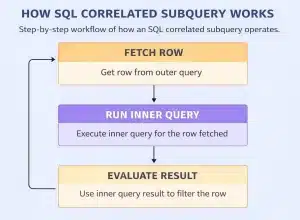
While working on the Database Management System, you might have seen two or more SQL Subqueries getting merged to filter the Database Values in the Table. If the DBMS Table Filteration Process is too large, the “SQL Correlated Subqueries” concept comes into action.
You might have heard about the Subquery Concept in SQL, but the Correlated Subquery must be new to you. The purpose of using the SQL Correlated Subquery is to reduce the work to get a simple object from different database tables.
This article is intended to focus on the Correlated Subquery Of SQL Language along with its syntax & simple implementation process. So, let’s start our extensive discussion on this underrated concept.
Summary or Key Highlights:
Correlated Subqueries are an important tool of SQL Language to make Table Referenced.
The Correlated Subquery is quite different from the SQL Join Statement.
The Correlated Subquery can be act on the same table multiple times.
The Correlated Subquery is implemented between the Outer Query Block & Inner Query Block.
The Correlated Subquery acts on each row processed in the Database System.
What Are Correlated Subquery or Synchronized Subquery In SQL?
The Correlated Subquery must be understood in your starting period of the DBMS Classes. The Correlated Subquery is an important feature of SQL Language. The Correlated Subquery can be written between the Outer Query & Inner Query.
In between these two queries, the Correlated Subquery can be placed with the help of the Where Clause. You might have to be thinking that the concept is looking more similar like you use Normal Subqueries in SQL. But the concept is quite different.
The Normal Subquery or Query returns a single value that is being filtered. However, the Correlated Subquery returns each value from the rows as it works as the Repeating Subquery. Every row is processed through this Correlated Subquery Concept.
What Are Outer Query & Inner Query?
In the above discussion, you might have noticed, that we have used two terms, Outer Query & Inner Query. Before moving ahead in the implementation process & syntax of Correlated Subquery Of SQL, it is need to have a look at that concept.
The Outer Query is the block that is present at the front of any SQL Query. The Outer Query makes the outcome of any certain statement executed. The Outer Query is also termed the Main Query as it plays the main role in the process.
The Inner Query is the block that is present after the Where Clause. The Inner Query is not the Main Query as it is not executed first. The Inner Query highly depends upon the Outer Query. The Concept of Inner & Outer Query will become more clear as you will proceed further.
How To Create Correlated Subqueries In SQL?
Now, it is time to discuss some core concepts of the Correlated Subquery. Here, we are going to discuss the process of creating a Correlated Subquery with SQL Language. We will discuss a Simple Syntax of Correlated Subquery.
Here, we are not going to implement a Complete Table to make the Correlated Subquery example. We will just have a look at the SQL Statement & its Syntax Structure. So, let us have a look at the following query.
SELECT c1, c2 FROM table AS t1 WHERE c3 = (SELECT c4 FROM table AS t2 WHERE t2.c3 = t1.c3);
From the above query, you can notice the Where Clause is used. The First part before the First Where Clause will be the Outer Query. The next part of the First Where Clause is in the Inner Query. You can also notice the Inner Query is kept in two braces.
Here, the “T1” is used just before the Where in the Outer Query Part. The “T1” is the Correlated Subquery here that is made with the help of the Where. The way the Correlated Subquery works will be discussed later.
How To Use Correlated Subqueries In SQL?
Now, it is time to do some practical work with the Correlated Subqueries. Here, we are going to implement the Correlated Subqueries from scratch. That means we will first declare the Table in DBMS & then provide some values there.
After that with the help of the same query discussed above, the Correlated Subquery will be defined. So, let’s just start by making a table like the Employees Table or Orders Table. However, in this case, we will declare a new table Code Table instead of Employees Table.
Step 1: Create Table First
The first thing will be to declare the Table in the SQL Program. Here, we will implement the Code Table with the SQL Create Command. The table will have the following entities.
ID: Each Programming Language will have a particular ID. The ID will also be the Primary key.
Language: Here, the used programming languages should be marked.
Lines: The total Lines of Code will be discussed here. It can only hold the Integer Values.
Developer: The Name of the Developer will be displayed & stored here.
-- Creating Table Code with ID, Language, Lines & Developer Name
CREATE TABLE Code (ID INT PRIMARY KEY, Language VARCHAR(50), Lines INT, Developer VARCHAR(50));
Step 2: Insert Values Into The Table
Now, as the formation of the table is completed, the following query will be used to Insert Values in the table. The Query Returns an SQL Table with all the values mentioned here. As per the Datatype of the Entities, the values are assigned.
-- Inserting Values in Code Table in Proper Sequence as Developed
INSERT INTO Code (ID, Language, Lines, Developer) VALUES
(1, 'Python', 150, 'Tom'),
(2, 'Java', 200, 'Bob'),
(3, 'C++', 120, 'Krish'),
(4, 'Python', 100, 'Eve'),
(5, 'JavaScript', 180, 'SG');
Step 3: Implement The Correlated Subqueries In The Table
Now, after inserting values into the table, it is time to declare Correlated Subqueries there. For that purpose, you have to use the following query.
-- Selecting Language & Lines as the Outer Query using Where
SELECT Language, Lines FROM Code c1 WHERE Lines > (SELECT AVG(Lines)FROM Code c2 WHERE c2.Language = 'Python');
Explanation:
The Outer Query will access the Language and Lines from the Code which is marked as C1.
The Inner Query will access the Average of Lines from Code for only Python.
If the Outer Query is greater than the Inner Query, then only the output will arrive.
Output:
From the above output, we can see that Python, Java & JavaScript are coming with the Number of Lines. As the Number of Lines is greater than the Average Of Lines, that is why they appear. So, the Command is executing well.
How To Implement Correlated Subquery With Exists Operator?
Now, from the above discussion, the way to use the Outer Query or Main Query should become clear to you. Now, we are going to demostrate the same thing with the help of the Exists Operator or Exists Keyword.
The Exists Operator is used to check the existence of any data or record in the subquery. And it can be used in the Outer Query or Main Query as well. Let us check the following query for the same. We will use the same Code Table here as well.
-- Selecting ID & Developer as the Outer Query using Where
SELECT ID, Developer FROM Code c1 WHERE EXISTS (SELECT 1 FROM Code c2 WHERE c1.Lines > c2.Lines );
Explanation:
We will access the ID and Developer Name as the Outer Query before the Where Exists.
After the Exists Operator, the Braces will be used. In between, we will look for some Lines greater than the C2 Lines.
If the assistance is accessible, then some data will be printed on the output screen.
Output:
From the above output, we can see all the records are coming except ID Number 4. The ID Number 4 is not coming as the Exists Operator is filtering out the value. So, in this way, you can use other types of SQL Commands as well.
In case, you’re facing difficulties in understanding the output tables, then you ask for SQL homework help from experts online.
How To Implement Nested Query In Correlated Subquery Of SQL?
Now, after completing the basic concept of the Correlated Subquery, it is time to move ahead in some complicated topic. Here, the Correlated Subquery of SQL will be implemented with the Nested Correlated Query.
That means with the Correlated Subquery, there will be another query added. And that query can be implemented from any clause. The Row processed will be through the Nested Correlated Subquery in your table. Here, we are going to use the same table.
-- Selecting Developer & ID and Counting ID in the Outer Query using Where & Group By Clause
SELECT Developer, COUNT(ID) AS CodeCount FROM Code c1 WHERE Lines > (SELECT AVG(Lines) FROM Code c2) GROUP BY Language;
Explanation:
Here, the Outer Query will access the Developer and Count of Every Programming ID.
The Count of every Programming ID will be termed as the CodeCount in the table.
Now, the Average Line will be selected after the Where Statement in SQL Command.
At the end, the Group By Clause will be used for the Programming Language.
This can be implemented if the Outer Query Lines are treated than the Inner One.
Output:
From the above output, we can see that only the Bob & SG Developer Names are coming with the Code Count as 1 because they have written the code only in one programming language. So, the SQL Command is working fine.
Why Do We Use Correlated Subqueries in SQL?
There are many reasons involved that you have to highlight before you start working on the concept. If the reasons for using the Correlated Subqueries are clarified for you, there should not be any more doubt left in your mind. So, let us have a look at the following points.
Row-by-Row Processing: Correlated Subquery can be used to process each row of the outer query one by one. This helps to work on each outer query row & apply specific conditions there. You can R Concepts in SQL easily using Correlated Subquery.
Dynamic Comparisons: Dynamic Comparison can be possible with the Correlated Subquery using SQL Language. The comparison between different rows in a single or multiple tables can easily be done using Correlated Subquery.
Complex Filters: Using the Correlated Subquery, you can add a complex filter process. If you use simple Where, Group By, etc. clauses, the filter process in the table will consume a lot of statements to get a target which can be simply achieved with Correlated Subquery.
Data Integrity Checks: The Correlated Subquery can be highly used in the Data Integrity Checking process. Also, the Correlated Subquery can be utilized for the Validation of Data in any table before going for the final operation on the table.
Hierarchical Data Queries: If you are working in any table that is connected with some Hierarchical Table earlier, then the Correlated Subquery should be used. The Correlated Subquery is used for the Parent & Child Hierarchical Relationship.
What Is The Difference Between SQL Correlated Subquery & Join Statement?
Now, in the end, we can say that the Concepts of Correlated Subquery is now become clear for you. So, we will conclude our discussion with a small Difference Table Drawing. Here, we will discuss the difference between Correlated Subquery & Join Statement.
Many individuals think that the Correlated Subquery is way more similar to the Join Statement as this can also be worked on two or more tables. But, there are many differences present between Correlated Subquery & Join. Let us have a look at the following points of difference.
Conclusion:
In the end, we can say, it is necessary to learn about “SQL Correlated Subqueries” well in manner.
The Correlated Subquery can be termed as the Basic Concept of SQL. So, it is recommended to grasp the complete Basic Foundation of SQL before moving on to any complex topic. If your basic knowledge of SQL is clear, you can easily get some other advanced topics.
if you are just getting started with DBMS and learning how to implement queries, you will definitely find grasping this concept helpful. We understand that DBMS can be a difficult concept as it involves coding. Then you can ask for DBMS help online from CodingZap experts.
Takeaways:
Correlated Subquery is an important concept of SQL that works on the same or different tables.
There is a big role for Inner Query & Outer Query in the Correlated Subquery of SQL.
The Correlated Subquery is different from the Join Statement of the SQL.
The Correlated Subquery helps to filter the database with different queries simultaneously.
The Correlated Subquery can be implemented with different other clauses as well.
If any other clauses are used with Correlated Subquery, then the Nested Operation will be developed.